> ## Documentation Index
> Fetch the complete documentation index at: https://docs.usertour.io/llms.txt
> Use this file to discover all available pages before exploring further.
# Webhooks
> Get Usertour events, content publishes, and user / company changes POSTed to your own endpoint the moment they happen — signed, retried, and logged.
Webhooks push what happens in Usertour to a URL you control: a user completes a flow, answers a survey question, a company's attributes change, a version is published. Each message is a signed JSON POST that references the same objects and ids the [REST API](/api-reference-v2/introduction) uses, so a receiver can look anything up without a translation layer.
Key ideas, up front:
* **Endpoints belong to an environment.** Production and Staging each have their own list; an endpoint only ever receives that environment's traffic.
* **You subscribe by topic.** `event.tracked.flow_completed`, `user.updated`, `content.published`, … — or a whole family at once so future additions flow in automatically.
* **Every message is signed** with a per-endpoint secret (`X-Usertour-Signature`), so your receiver can verify it really came from Usertour and hasn't been tampered with.
* **Delivery is at-least-once with retries.** A stable message id lets you deduplicate; the message log shows every attempt and lets you re-send.
* **Availability.** On Usertour Cloud, webhooks are included from the **Starter** plan; self-hosted instances are never gated. Managing endpoints requires the **Owner** role.
## Create an endpoint
Go to **Settings → Webhooks** (pick the environment first — the page is per environment) and click **New webhook**.
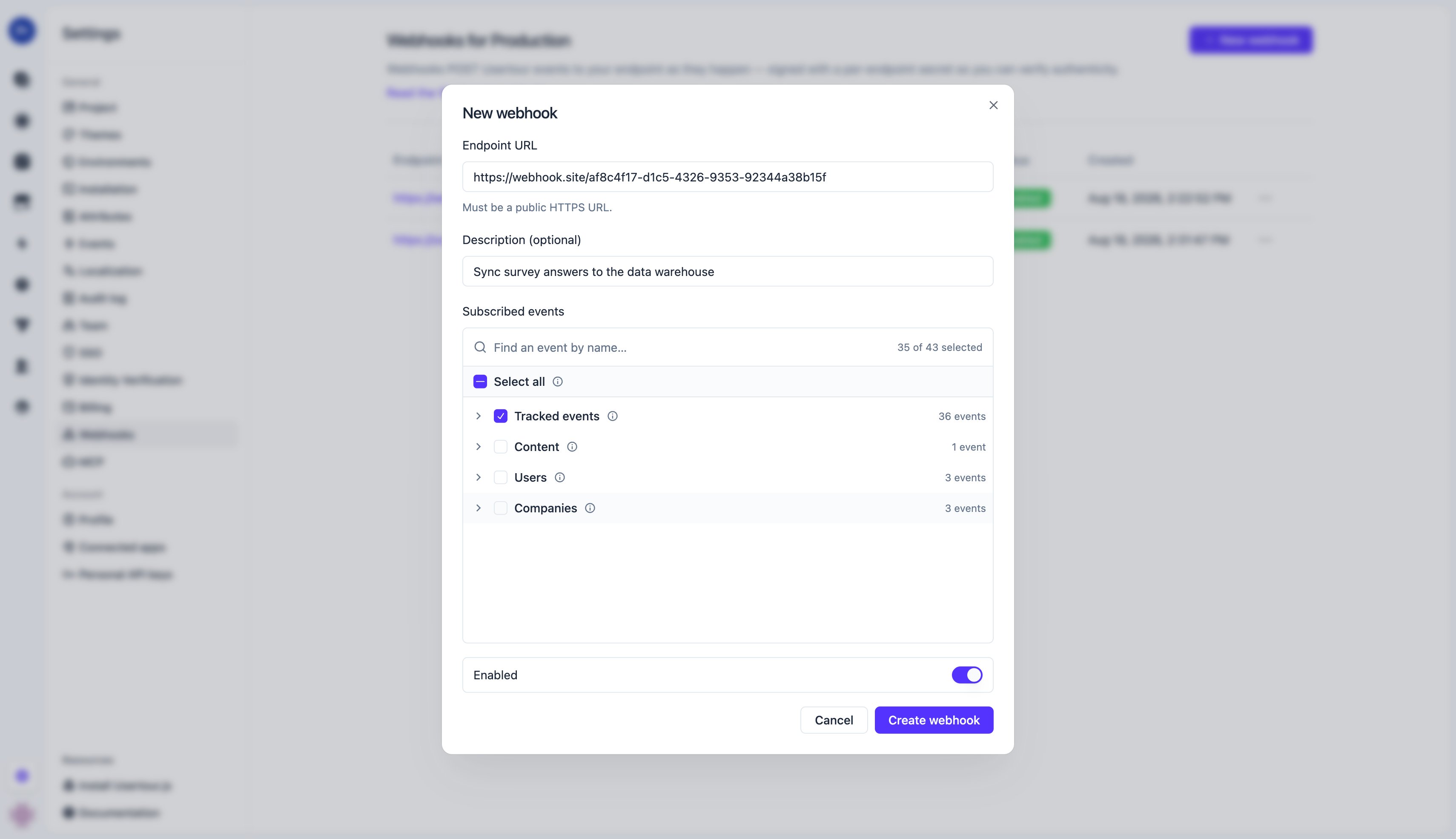 | Field | Notes |
| ----------------- | ------------------------------------------------------------------------------------------------------------------------------------------------------------------------------------------------------------------------------------------------------------------------------------------------------------------ |
| Endpoint URL | Must be `https://` and reachable on the public internet. Private / internal addresses (`localhost`, `10.x`, `192.168.x`, …) are refused; on self-hosted instances the operator can lift that with `ALLOW_PRIVATE_NETWORK_EGRESS=true` (see [environment variables](/open-source/env)). Redirects are not followed. |
| Description | Optional label for your team. |
| Subscribed events | What to send — see [Topics](#topics). |
| Enabled | Off pauses delivery without deleting the endpoint or its secret. |
Creating the endpoint generates its **signing secret** (`whsec_…`). Open the endpoint's detail page to reveal or copy it, and to rotate it — rotation takes effect immediately, including for retries already in flight, so update your receiver first.
| Field | Notes |
| ----------------- | ------------------------------------------------------------------------------------------------------------------------------------------------------------------------------------------------------------------------------------------------------------------------------------------------------------------ |
| Endpoint URL | Must be `https://` and reachable on the public internet. Private / internal addresses (`localhost`, `10.x`, `192.168.x`, …) are refused; on self-hosted instances the operator can lift that with `ALLOW_PRIVATE_NETWORK_EGRESS=true` (see [environment variables](/open-source/env)). Redirects are not followed. |
| Description | Optional label for your team. |
| Subscribed events | What to send — see [Topics](#topics). |
| Enabled | Off pauses delivery without deleting the endpoint or its secret. |
Creating the endpoint generates its **signing secret** (`whsec_…`). Open the endpoint's detail page to reveal or copy it, and to rotate it — rotation takes effect immediately, including for retries already in flight, so update your receiver first.
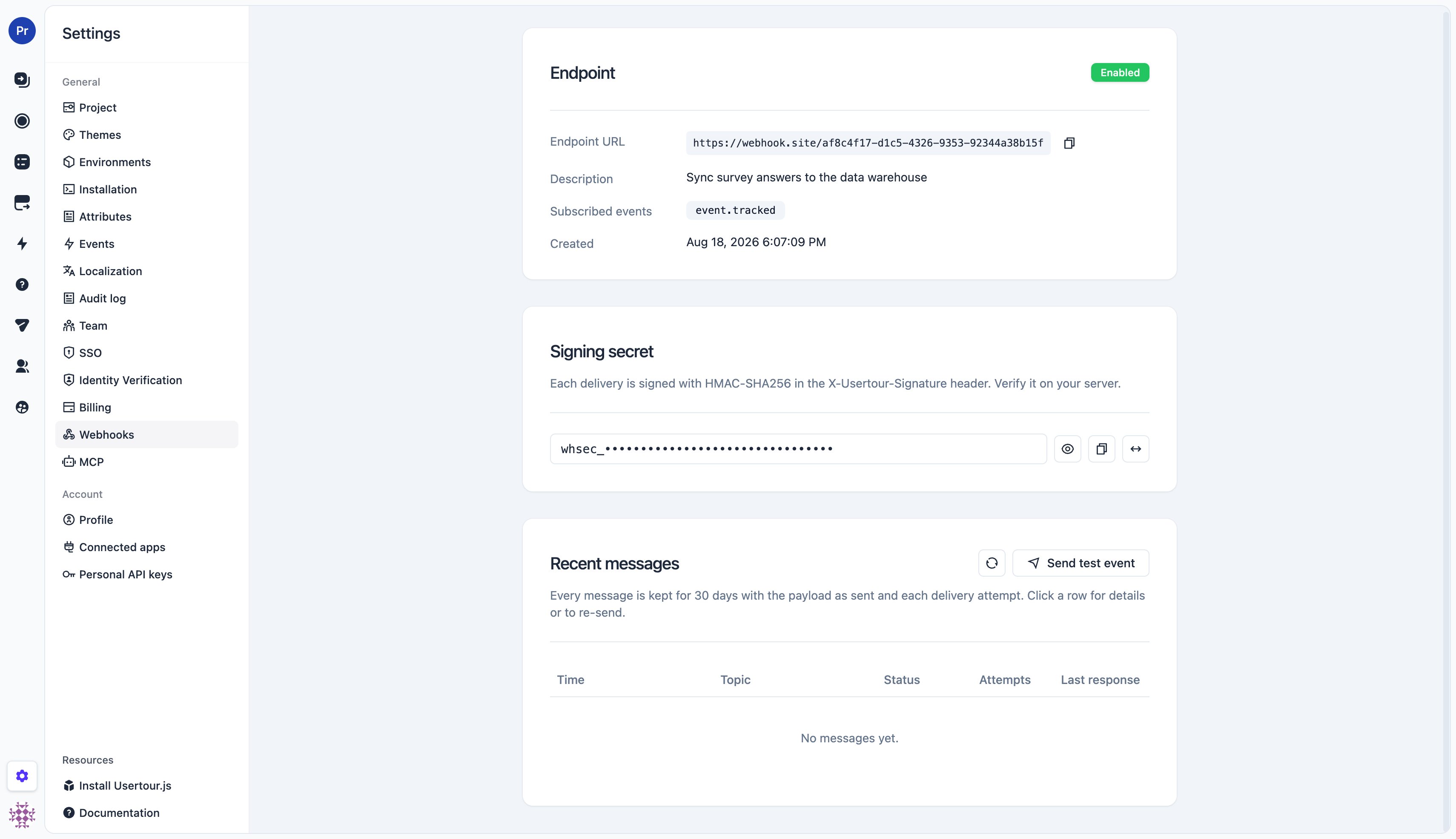 **Trying it out before you have a receiver.**
* **Fastest check:** save the endpoint and hit **Send test event** — a
`webhook.test` message arrives immediately, so you can confirm the URL is
reachable and your signature check works before any real event fires.
* **No receiver yet?** Point the endpoint at a request-inspection service
such as [webhook.site](https://webhook.site) or
[Beeceptor](https://beeceptor.com): they hand you a throwaway HTTPS URL and
show every request they receive, headers included.
* **Receiver running on your machine?** It needs a public HTTPS address, so
put a tunnel in front of it — [ngrok](https://ngrok.com) or
[cloudflared](https://developers.cloudflare.com/cloudflare-tunnel/) forward
a public URL to `localhost`. (A tunnel is not a receiver: your own service
still has to be running behind it.) Self-hosted operators can skip the
tunnel by setting `ALLOW_PRIVATE_NETWORK_EGRESS=true` and pointing the
endpoint straight at `http://localhost:…`.
## Topics
A topic names one kind of message. Subscriptions are a tree — pick a leaf, a family, or everything:
| Subscribe to | Delivers | Future additions |
| -------------------------- | ------------------------------------------------------- | --------------------------------------------------------------------- |
| `*` | Every topic | Included automatically |
| `event.tracked` | Every tracked (behavior) event | New event types (including your custom events) included automatically |
| `event.tracked.` | One event, e.g. `event.tracked.flow_completed` | — |
| `content` | Every content notification (today: `content.published`) | Included automatically |
| `content.published` | A content version was published to this environment | — |
| `user` | `user.created`, `user.updated`, `user.deleted` | Included automatically |
| `company` | `company.created`, `company.updated`, `company.deleted` | Included automatically |
`` is the event's code name as shown in **Settings → Events** — built-in ones such as `flow_started`, `flow_step_seen`, `flow_completed`, `flow_ended`, `checklist_started`, `checklist_task_completed`, `checklist_completed`, `launcher_activated`, `banner_seen`, `resource_center_opened`, `event_tracker_completed`, `question_answered`, `announcement_seen`, plus any custom event you track with `usertour.track()`.
**`page_viewed` is high-volume and is *not* included by `*` or `event.tracked`.** Subscribe to `event.tracked.page_viewed` explicitly if you really want every page view.
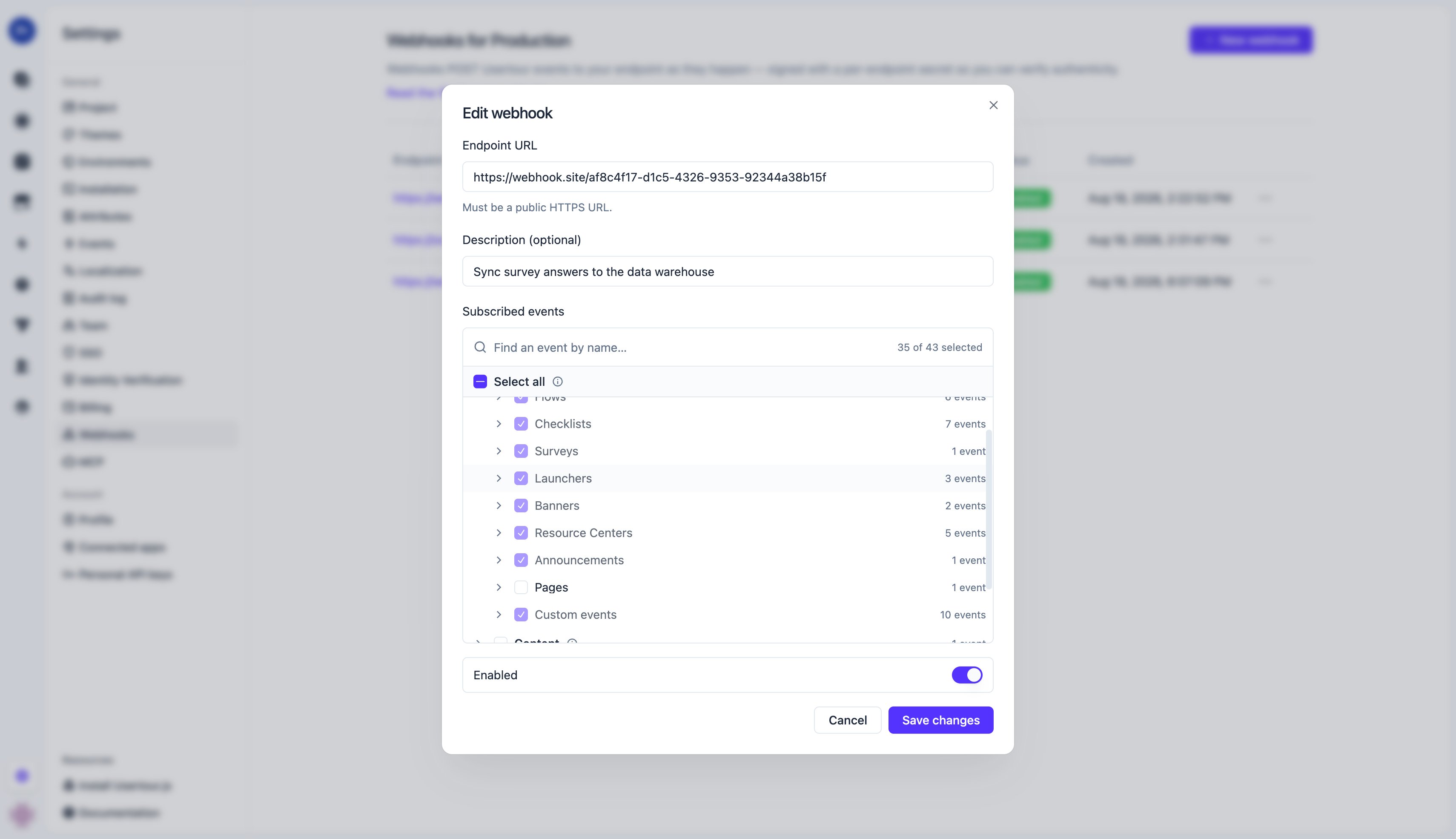
In the dashboard the same tree is a picker: **Select all** stores `*`, checking a family (Tracked events / Content / Users / Companies) stores its prefix, and checking individual events stores exact topics. Groups such as *Flows* or *Checklists* are a convenience that expands to their current events — they don't auto-include events added later; check the whole *Tracked events* family for that.
**Trying it out before you have a receiver.**
* **Fastest check:** save the endpoint and hit **Send test event** — a
`webhook.test` message arrives immediately, so you can confirm the URL is
reachable and your signature check works before any real event fires.
* **No receiver yet?** Point the endpoint at a request-inspection service
such as [webhook.site](https://webhook.site) or
[Beeceptor](https://beeceptor.com): they hand you a throwaway HTTPS URL and
show every request they receive, headers included.
* **Receiver running on your machine?** It needs a public HTTPS address, so
put a tunnel in front of it — [ngrok](https://ngrok.com) or
[cloudflared](https://developers.cloudflare.com/cloudflare-tunnel/) forward
a public URL to `localhost`. (A tunnel is not a receiver: your own service
still has to be running behind it.) Self-hosted operators can skip the
tunnel by setting `ALLOW_PRIVATE_NETWORK_EGRESS=true` and pointing the
endpoint straight at `http://localhost:…`.
## Topics
A topic names one kind of message. Subscriptions are a tree — pick a leaf, a family, or everything:
| Subscribe to | Delivers | Future additions |
| -------------------------- | ------------------------------------------------------- | --------------------------------------------------------------------- |
| `*` | Every topic | Included automatically |
| `event.tracked` | Every tracked (behavior) event | New event types (including your custom events) included automatically |
| `event.tracked.` | One event, e.g. `event.tracked.flow_completed` | — |
| `content` | Every content notification (today: `content.published`) | Included automatically |
| `content.published` | A content version was published to this environment | — |
| `user` | `user.created`, `user.updated`, `user.deleted` | Included automatically |
| `company` | `company.created`, `company.updated`, `company.deleted` | Included automatically |
`` is the event's code name as shown in **Settings → Events** — built-in ones such as `flow_started`, `flow_step_seen`, `flow_completed`, `flow_ended`, `checklist_started`, `checklist_task_completed`, `checklist_completed`, `launcher_activated`, `banner_seen`, `resource_center_opened`, `event_tracker_completed`, `question_answered`, `announcement_seen`, plus any custom event you track with `usertour.track()`.
**`page_viewed` is high-volume and is *not* included by `*` or `event.tracked`.** Subscribe to `event.tracked.page_viewed` explicitly if you really want every page view.
In the dashboard the same tree is a picker: **Select all** stores `*`, checking a family (Tracked events / Content / Users / Companies) stores its prefix, and checking individual events stores exact topics. Groups such as *Flows* or *Checklists* are a convenience that expands to their current events — they don't auto-include events added later; check the whole *Tracked events* family for that.
 ## Message format
Every delivery is a JSON body with a fixed envelope. `type` is the topic, `id` is the message id (stable across retries and re-sends — use it to deduplicate), and `data` depends on the topic.
```json theme={null}
{
"id": "whmsg_fedf230a05d01bfe38e494fb65b24e8a",
"object": "webhookMessage",
"type": "event.tracked.flow_completed",
"createdAt": "2026-08-18T06:22:57.445Z",
"environmentId": "cmsifx2vh00yombd93flnwito",
"data": { ... }
}
```
**Two naming layers.** Field names that Usertour defines — the envelope and
the objects inside `data` — are camelCase, identical to the [REST
API](/api-reference-v2/introduction). Keys **inside** `attributes` are event
or user/company attribute code names, passed through exactly as they exist in
your workspace: built-in ones are snake\_case (`flow_id`, `page_url`), and
custom ones appear under whatever code name you created them with. They are
deliberately not rewritten, so the key you filter on in Usertour is the key
you receive here.
### `event.tracked.*`
`data.event` is the [event object](/api-reference-v2/introduction) — the same shape the REST API returns. `userId` / `companyId` are the ids you passed to `identify()` / `group()`; `sessionId` / `contentId` / `versionId` are set for session-scoped events (flow, checklist, banner, …) and `null` for sessionless ones (custom `track()` events, trackers); `attributes` holds the event's properties (the per-type `*_id` / `*_name` / `*_version_*` fields plus `page_url` and viewport size).
```json theme={null}
{
"data": {
"event": {
"id": "cmsy9dq2v000589thb2k9v6zj",
"object": "event",
"codeName": "flow_completed",
"eventDefinitionId": "cmso7q1e800xdli95v3s6i2m9",
"createdAt": "2026-08-18T06:25:21.100Z",
"userId": "user_123",
"companyId": "acme",
"sessionId": "cmsy9dpz9000389th7v6c1w9k",
"contentId": "cmso7pqf000x8li95p8sa0ca1",
"versionId": "cmso7pqf500xali95hneffgbl",
"attributes": {
"flow_id": "cmso7pqf000x8li95p8sa0ca1",
"flow_name": "Onboarding",
"flow_version_id": "cmso7pqf500xali95hneffgbl",
"flow_version_number": 1,
"page_url": "https://app.example.com/dashboard",
"viewport_width": 1440,
"viewport_height": 852
}
}
}
}
```
### `content.published`
A thin notification — ids only. Fetch details from `GET /v2/projects/{projectId}/content/{contentId}` and its versions endpoint if you need them.
```json theme={null}
{ "data": { "contentId": "cmso7pqf000x8li95p8sa0ca1", "versionId": "cmso7pqf500xali95hneffgbl" } }
```
### `user.created` / `user.updated` / `user.deleted` and `company.*`
`data.user` (or `data.company`) is the full object as of the change — for `deleted`, as it was just before deletion. `updated` additionally carries `previousAttributes`: the **old** values of only the attributes that changed or were removed, so you can tell *what* changed without diffing.
```json theme={null}
{
"data": {
"user": {
"id": "user_123",
"object": "user",
"attributes": { "name": "Ada Lovelace", "plan": "growth", "email": "ada@example.com" },
"createdAt": "2026-07-01T09:00:00.000Z",
"companies": null,
"memberships": null
},
"previousAttributes": { "plan": "starter" }
}
}
```
`created` and `updated` fire only when attributes actually change — an `identify()` that repeats the same values sends nothing. Timestamp bookkeeping such as `last_seen_at` never triggers a notification.
### `webhook.test`
Sent by the **Send test event** button: the envelope with `"type": "webhook.test"` and `"data": {}`. Handy for checking connectivity and signature verification.
## Verify the signature
Each request carries an `X-Usertour-Signature` header:
```
X-Usertour-Signature: t=1787034177,v1=1f72734d33a5d2433ad825e7891c37ac3bf6910010f946098c8d9c53169bae42
```
* `t` — Unix timestamp (seconds) of the attempt
* `v1` — HMAC-SHA256, hex, keyed with the endpoint's signing secret (the whole `whsec_…` string), over the string `"{t}.{raw body}"`
To verify: read the **raw request body bytes** (before any JSON parsing or re-serialization), recompute the HMAC over `t + "." + body`, and compare it to `v1` in constant time. Reject requests whose `t` is outside a tolerance window (5 minutes is typical) to block replays.
```js Node.js (Express) theme={null}
const express = require('express');
const { createHmac, timingSafeEqual } = require('node:crypto');
const SECRET = process.env.USERTOUR_WEBHOOK_SECRET; // whsec_…
const TOLERANCE_SEC = 300;
const app = express();
// Raw body: the signature is over the exact bytes Usertour sent.
app.post('/usertour', express.raw({ type: 'application/json' }), (req, res) => {
const header = req.get('X-Usertour-Signature') ?? '';
const parts = Object.fromEntries(header.split(',').map((kv) => kv.split('=')));
const t = Number(parts.t);
const v1 = parts.v1 ?? '';
if (!t || Math.abs(Date.now() / 1000 - t) > TOLERANCE_SEC) {
return res.status(400).send('stale');
}
const expected = createHmac('sha256', SECRET)
.update(`${t}.${req.body.toString('utf8')}`)
.digest('hex');
if (expected.length !== v1.length || !timingSafeEqual(Buffer.from(expected), Buffer.from(v1))) {
return res.status(401).send('bad signature');
}
const message = JSON.parse(req.body.toString('utf8'));
// Deduplicate on message.id, respond 2xx quickly, then process.
res.status(200).send('ok');
handle(message);
});
```
```python Python (Flask) theme={null}
import hmac, hashlib, os, time
from flask import Flask, request, abort
SECRET = os.environ["USERTOUR_WEBHOOK_SECRET"].encode() # whsec_…
TOLERANCE_SEC = 300
app = Flask(__name__)
@app.post("/usertour")
def usertour():
header = request.headers.get("X-Usertour-Signature", "")
parts = dict(kv.split("=", 1) for kv in header.split(",") if "=" in kv)
t = int(parts.get("t", "0") or 0)
v1 = parts.get("v1", "")
if not t or abs(time.time() - t) > TOLERANCE_SEC:
abort(400)
body = request.get_data() # raw bytes
expected = hmac.new(SECRET, f"{t}.".encode() + body, hashlib.sha256).hexdigest()
if not hmac.compare_digest(expected, v1):
abort(401)
message = request.get_json()
# Deduplicate on message["id"], respond 2xx quickly, then process.
return "ok", 200
```
Verify against the **raw body**. Frameworks that parse JSON before your handler runs (and hand you a re-serialized string) will produce a different byte sequence and the signature will not match.
## Delivery, retries, and the message log
* **Success** is any `2xx` response within **10 seconds**. Respond first, do the work afterwards.
* **Anything else** — a non-2xx status, a timeout, a connection error, or a redirect — counts as a failure and is retried with growing delays over roughly **24 hours**: **8 attempts** in total (after \~5 s, 1 m, 10 m, 1 h, 4 h, 8 h, 12 h). An outage on your side that lasts less than a day heals itself — every message is delivered once the receiver is back, no action needed. All attempts carry the same body and message `id`; only the signature timestamp changes.
* **Rate limiting**: respond `429` (or `503`) with a `Retry-After` header and the next attempt waits at least that long (never sooner than the schedule above); the header is ignored on other statuses.
* **Ordering is not guaranteed** across messages; use `createdAt` (and the object's own timestamps) rather than arrival order.
* **Repeated failures pause deliveries briefly.** After 10 failed attempts in a row the endpoint **cools down** (starting at 1 minute, growing to at most 1 hour while failures continue — the dashboard shows a *Cooling down* badge). Deliveries are **held, not dropped**: everything is sent once the pause ends or a **Send test event** succeeds. If an endpoint keeps failing for **7 days**, Usertour disables it and emails the project owner; re-enable it after fixing the receiver and use Resend for anything you need.
* **Disabled or deleted endpoints** drop their in-flight deliveries; the drops are recorded in the message log as failed attempts, so after re-enabling you can see and re-send what was missed.
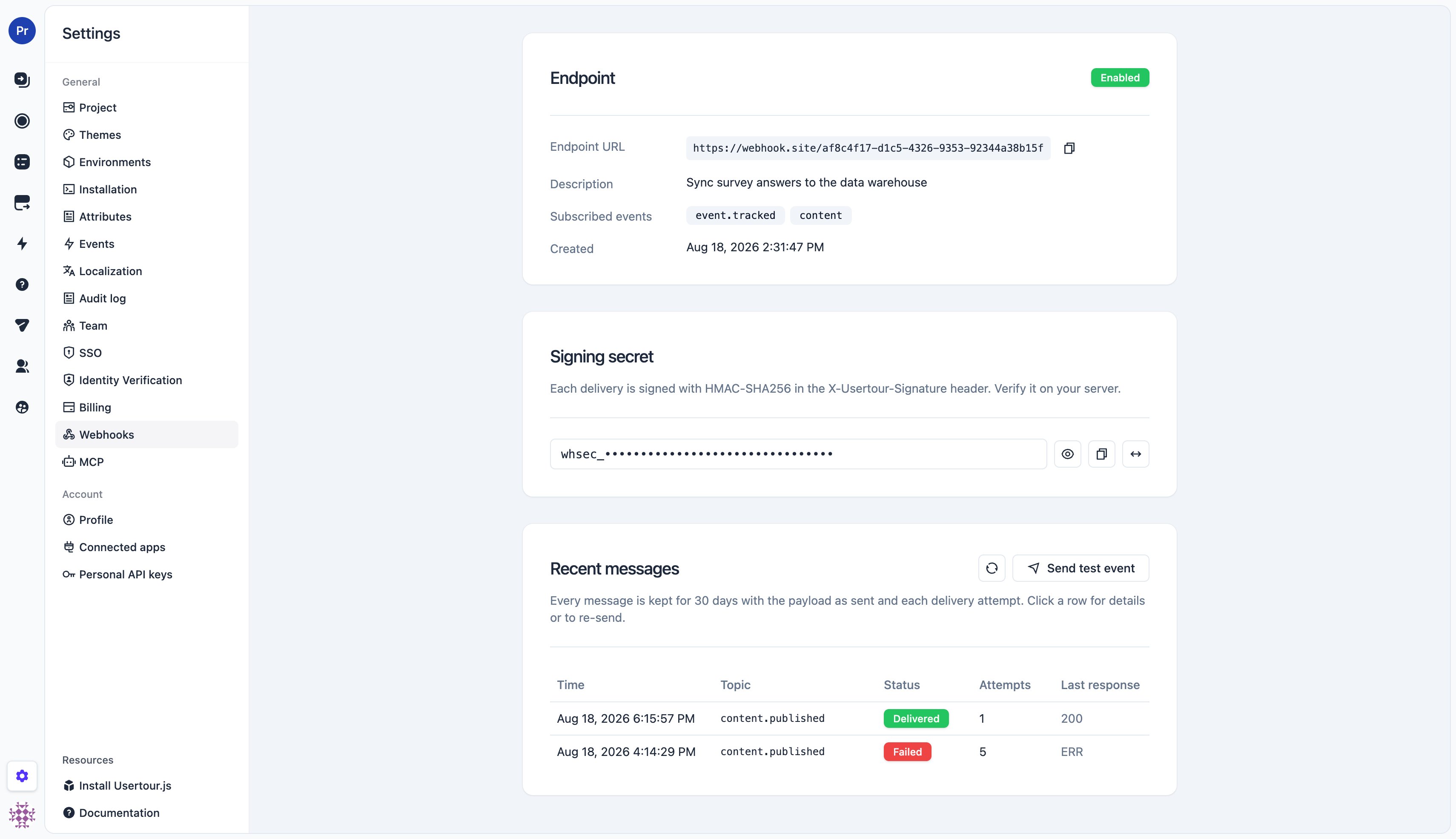
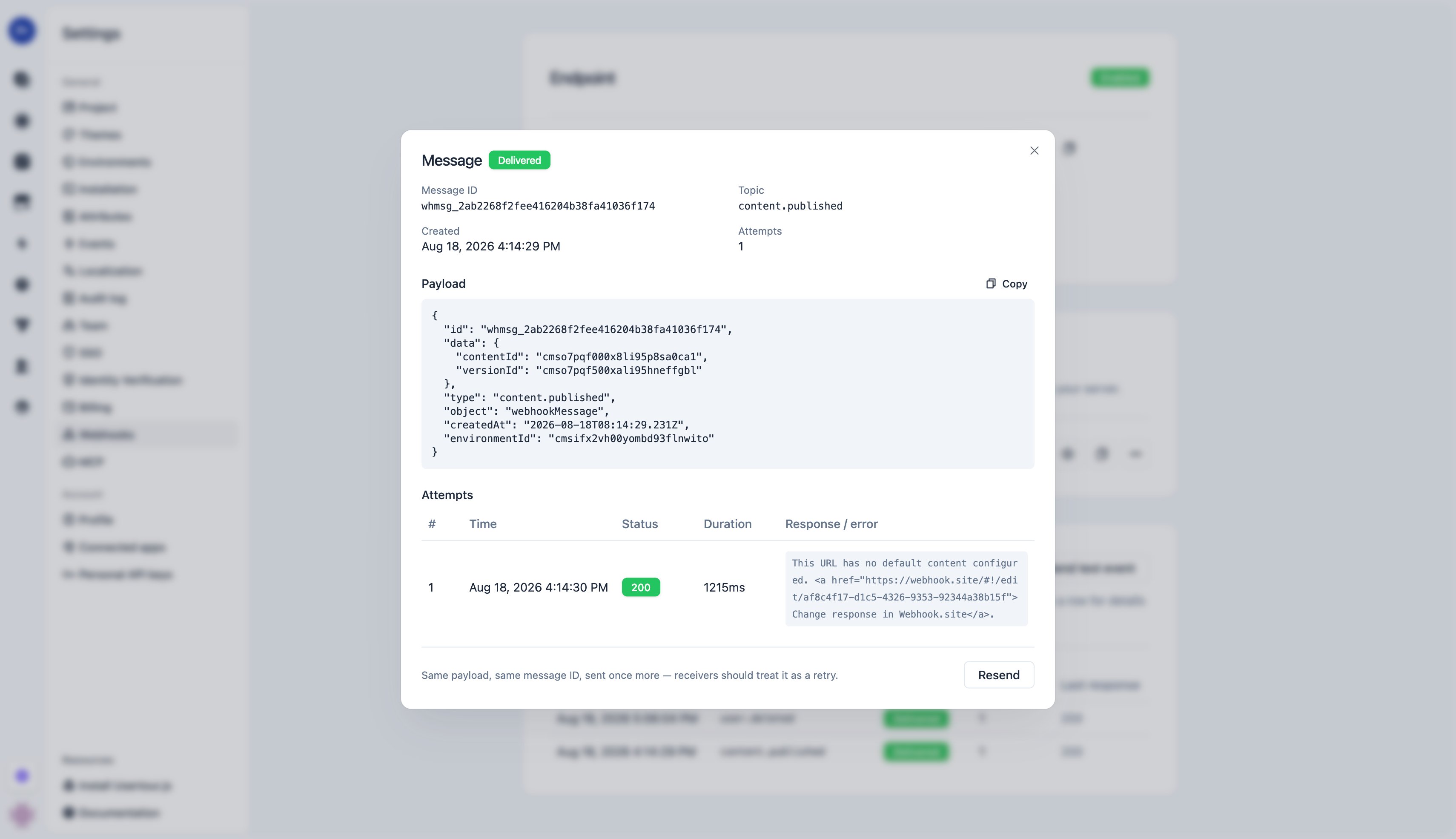
* **The message log** on the endpoint's detail page keeps every message for **30 days**: the payload as sent and each attempt with status code, response excerpt, and error. Open a message to inspect it or **Resend** it — the same payload under the same message id, as one more attempt — after fixing your receiver.
## Message format
Every delivery is a JSON body with a fixed envelope. `type` is the topic, `id` is the message id (stable across retries and re-sends — use it to deduplicate), and `data` depends on the topic.
```json theme={null}
{
"id": "whmsg_fedf230a05d01bfe38e494fb65b24e8a",
"object": "webhookMessage",
"type": "event.tracked.flow_completed",
"createdAt": "2026-08-18T06:22:57.445Z",
"environmentId": "cmsifx2vh00yombd93flnwito",
"data": { ... }
}
```
**Two naming layers.** Field names that Usertour defines — the envelope and
the objects inside `data` — are camelCase, identical to the [REST
API](/api-reference-v2/introduction). Keys **inside** `attributes` are event
or user/company attribute code names, passed through exactly as they exist in
your workspace: built-in ones are snake\_case (`flow_id`, `page_url`), and
custom ones appear under whatever code name you created them with. They are
deliberately not rewritten, so the key you filter on in Usertour is the key
you receive here.
### `event.tracked.*`
`data.event` is the [event object](/api-reference-v2/introduction) — the same shape the REST API returns. `userId` / `companyId` are the ids you passed to `identify()` / `group()`; `sessionId` / `contentId` / `versionId` are set for session-scoped events (flow, checklist, banner, …) and `null` for sessionless ones (custom `track()` events, trackers); `attributes` holds the event's properties (the per-type `*_id` / `*_name` / `*_version_*` fields plus `page_url` and viewport size).
```json theme={null}
{
"data": {
"event": {
"id": "cmsy9dq2v000589thb2k9v6zj",
"object": "event",
"codeName": "flow_completed",
"eventDefinitionId": "cmso7q1e800xdli95v3s6i2m9",
"createdAt": "2026-08-18T06:25:21.100Z",
"userId": "user_123",
"companyId": "acme",
"sessionId": "cmsy9dpz9000389th7v6c1w9k",
"contentId": "cmso7pqf000x8li95p8sa0ca1",
"versionId": "cmso7pqf500xali95hneffgbl",
"attributes": {
"flow_id": "cmso7pqf000x8li95p8sa0ca1",
"flow_name": "Onboarding",
"flow_version_id": "cmso7pqf500xali95hneffgbl",
"flow_version_number": 1,
"page_url": "https://app.example.com/dashboard",
"viewport_width": 1440,
"viewport_height": 852
}
}
}
}
```
### `content.published`
A thin notification — ids only. Fetch details from `GET /v2/projects/{projectId}/content/{contentId}` and its versions endpoint if you need them.
```json theme={null}
{ "data": { "contentId": "cmso7pqf000x8li95p8sa0ca1", "versionId": "cmso7pqf500xali95hneffgbl" } }
```
### `user.created` / `user.updated` / `user.deleted` and `company.*`
`data.user` (or `data.company`) is the full object as of the change — for `deleted`, as it was just before deletion. `updated` additionally carries `previousAttributes`: the **old** values of only the attributes that changed or were removed, so you can tell *what* changed without diffing.
```json theme={null}
{
"data": {
"user": {
"id": "user_123",
"object": "user",
"attributes": { "name": "Ada Lovelace", "plan": "growth", "email": "ada@example.com" },
"createdAt": "2026-07-01T09:00:00.000Z",
"companies": null,
"memberships": null
},
"previousAttributes": { "plan": "starter" }
}
}
```
`created` and `updated` fire only when attributes actually change — an `identify()` that repeats the same values sends nothing. Timestamp bookkeeping such as `last_seen_at` never triggers a notification.
### `webhook.test`
Sent by the **Send test event** button: the envelope with `"type": "webhook.test"` and `"data": {}`. Handy for checking connectivity and signature verification.
## Verify the signature
Each request carries an `X-Usertour-Signature` header:
```
X-Usertour-Signature: t=1787034177,v1=1f72734d33a5d2433ad825e7891c37ac3bf6910010f946098c8d9c53169bae42
```
* `t` — Unix timestamp (seconds) of the attempt
* `v1` — HMAC-SHA256, hex, keyed with the endpoint's signing secret (the whole `whsec_…` string), over the string `"{t}.{raw body}"`
To verify: read the **raw request body bytes** (before any JSON parsing or re-serialization), recompute the HMAC over `t + "." + body`, and compare it to `v1` in constant time. Reject requests whose `t` is outside a tolerance window (5 minutes is typical) to block replays.
```js Node.js (Express) theme={null}
const express = require('express');
const { createHmac, timingSafeEqual } = require('node:crypto');
const SECRET = process.env.USERTOUR_WEBHOOK_SECRET; // whsec_…
const TOLERANCE_SEC = 300;
const app = express();
// Raw body: the signature is over the exact bytes Usertour sent.
app.post('/usertour', express.raw({ type: 'application/json' }), (req, res) => {
const header = req.get('X-Usertour-Signature') ?? '';
const parts = Object.fromEntries(header.split(',').map((kv) => kv.split('=')));
const t = Number(parts.t);
const v1 = parts.v1 ?? '';
if (!t || Math.abs(Date.now() / 1000 - t) > TOLERANCE_SEC) {
return res.status(400).send('stale');
}
const expected = createHmac('sha256', SECRET)
.update(`${t}.${req.body.toString('utf8')}`)
.digest('hex');
if (expected.length !== v1.length || !timingSafeEqual(Buffer.from(expected), Buffer.from(v1))) {
return res.status(401).send('bad signature');
}
const message = JSON.parse(req.body.toString('utf8'));
// Deduplicate on message.id, respond 2xx quickly, then process.
res.status(200).send('ok');
handle(message);
});
```
```python Python (Flask) theme={null}
import hmac, hashlib, os, time
from flask import Flask, request, abort
SECRET = os.environ["USERTOUR_WEBHOOK_SECRET"].encode() # whsec_…
TOLERANCE_SEC = 300
app = Flask(__name__)
@app.post("/usertour")
def usertour():
header = request.headers.get("X-Usertour-Signature", "")
parts = dict(kv.split("=", 1) for kv in header.split(",") if "=" in kv)
t = int(parts.get("t", "0") or 0)
v1 = parts.get("v1", "")
if not t or abs(time.time() - t) > TOLERANCE_SEC:
abort(400)
body = request.get_data() # raw bytes
expected = hmac.new(SECRET, f"{t}.".encode() + body, hashlib.sha256).hexdigest()
if not hmac.compare_digest(expected, v1):
abort(401)
message = request.get_json()
# Deduplicate on message["id"], respond 2xx quickly, then process.
return "ok", 200
```
Verify against the **raw body**. Frameworks that parse JSON before your handler runs (and hand you a re-serialized string) will produce a different byte sequence and the signature will not match.
## Delivery, retries, and the message log
* **Success** is any `2xx` response within **10 seconds**. Respond first, do the work afterwards.
* **Anything else** — a non-2xx status, a timeout, a connection error, or a redirect — counts as a failure and is retried with growing delays over roughly **24 hours**: **8 attempts** in total (after \~5 s, 1 m, 10 m, 1 h, 4 h, 8 h, 12 h). An outage on your side that lasts less than a day heals itself — every message is delivered once the receiver is back, no action needed. All attempts carry the same body and message `id`; only the signature timestamp changes.
* **Rate limiting**: respond `429` (or `503`) with a `Retry-After` header and the next attempt waits at least that long (never sooner than the schedule above); the header is ignored on other statuses.
* **Ordering is not guaranteed** across messages; use `createdAt` (and the object's own timestamps) rather than arrival order.
* **Repeated failures pause deliveries briefly.** After 10 failed attempts in a row the endpoint **cools down** (starting at 1 minute, growing to at most 1 hour while failures continue — the dashboard shows a *Cooling down* badge). Deliveries are **held, not dropped**: everything is sent once the pause ends or a **Send test event** succeeds. If an endpoint keeps failing for **7 days**, Usertour disables it and emails the project owner; re-enable it after fixing the receiver and use Resend for anything you need.
* **Disabled or deleted endpoints** drop their in-flight deliveries; the drops are recorded in the message log as failed attempts, so after re-enabling you can see and re-send what was missed.
* **The message log** on the endpoint's detail page keeps every message for **30 days**: the payload as sent and each attempt with status code, response excerpt, and error. Open a message to inspect it or **Resend** it — the same payload under the same message id, as one more attempt — after fixing your receiver.
 ## Manage endpoints from the API or MCP
Endpoints are also a REST resource under the environment (`…/environments/{environmentId}/webhooks`), so you can provision them from scripts or infrastructure-as-code — the operations are listed under **Webhooks** in the [API reference](/api-reference-v2/introduction), and the [MCP server](/api-reference-v2/mcp) exposes them as `list_webhooks`, `create_webhook`, `update_webhook`, and `delete_webhook`. The token needs the `webhook:read` / `webhook:manage` scopes and, because webhooks act on a specific environment, must name that environment in its allowlist; single-object reads return the signing secret only when the token holds `webhook:manage` (the secret is the ability to sign deliveries); the list never includes it.
## Manage endpoints from the API or MCP
Endpoints are also a REST resource under the environment (`…/environments/{environmentId}/webhooks`), so you can provision them from scripts or infrastructure-as-code — the operations are listed under **Webhooks** in the [API reference](/api-reference-v2/introduction), and the [MCP server](/api-reference-v2/mcp) exposes them as `list_webhooks`, `create_webhook`, `update_webhook`, and `delete_webhook`. The token needs the `webhook:read` / `webhook:manage` scopes and, because webhooks act on a specific environment, must name that environment in its allowlist; single-object reads return the signing secret only when the token holds `webhook:manage` (the secret is the ability to sign deliveries); the list never includes it.