> ## Documentation Index
> Fetch the complete documentation index at: https://docs.usertour.io/llms.txt
> Use this file to discover all available pages before exploring further.
# Surveys/NPS
> Learn how to create and customize surveys to collect user feedback and measure satisfaction
## Overview
Before diving in, take a look at this quick video tutorial that shows you how to set up a Surveys/NPS flow step by step.
Usertour's survey feature lets you build in-app surveys to:
* Measure customer satisfaction (NPS, CSAT, CES)
* Collect user feedback
* Conduct user research
* Personalize user experiences
Since surveys are built on top of flows, you get all the power of Usertour's Flow Builder,including:
* Logic-based triggers
* Conditional branching
* Flexible placement
* Behavior-based timing
## Common Use Cases
### 1. NPS Surveys
Show a Net Promoter Score survey to active customers, typically 30 days after subscription.
### 2. CSAT/CES Surveys
Measure customer satisfaction or effort after completing specific tasks.
### 3. Feature Feedback
Collect feedback about:
* New features you've built
* Features you're considering building
### 4. User Profiling
Ask new users questions to personalize their experience:
* "What is your role within your company?"
* "How experienced are you with X software?"
* "What is your primary goal with using our software?"
## Building Surveys
### Creating a Survey Flow
1. Go to **Flows** in the sidebar
2. Click **Create flow**
3. Choose to:
* Start from scratch
* Use the NPS template
4. Name your flow and click **Create flow**
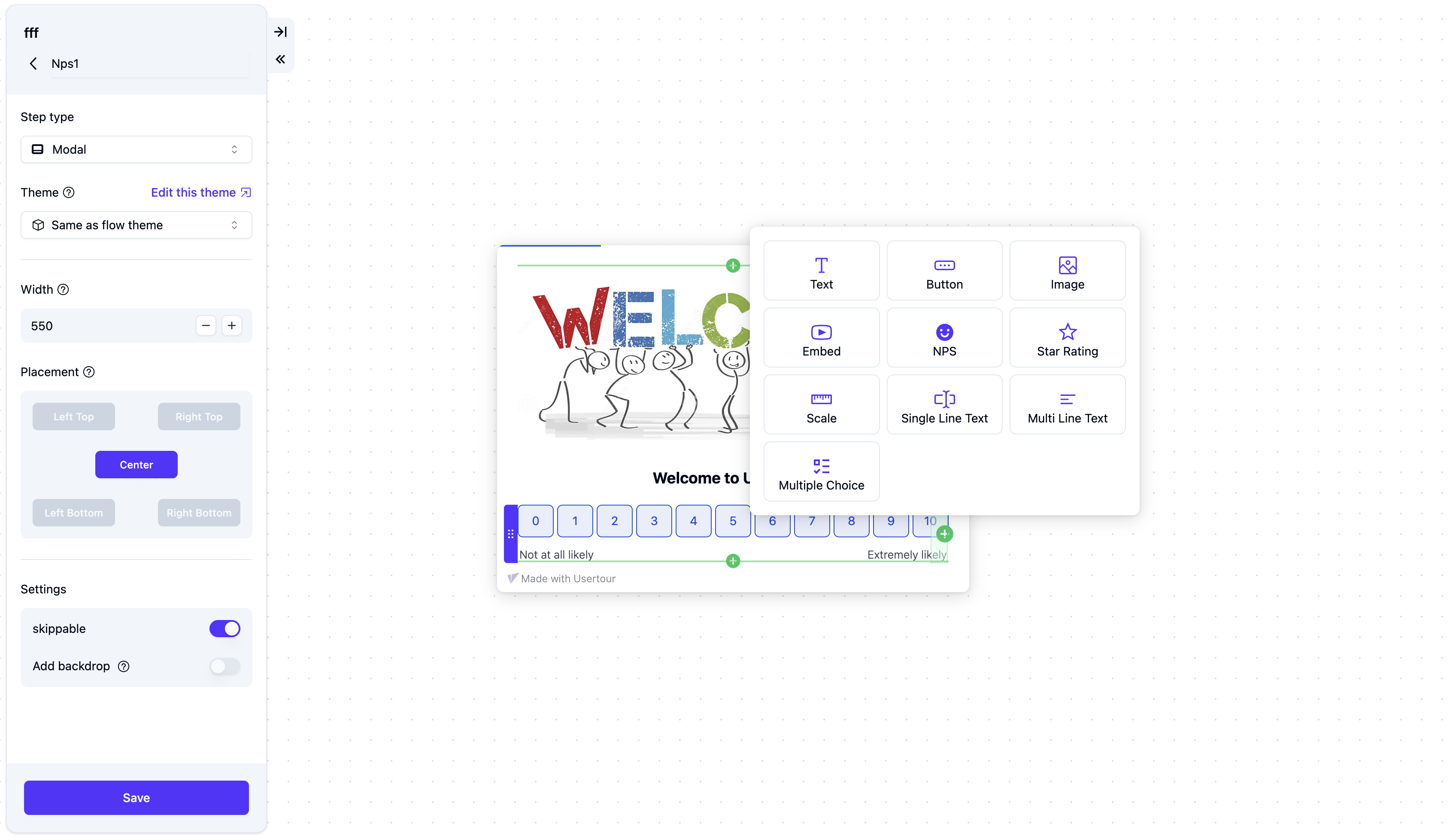
### Adding Questions
1. Add text to your first step (e.g., "What do you think about our product?")
2. Click the **+** button in the editor to open the content type selection dialog
3. Select **Question** from the dialog, which supports the following types:
* NPS (Net Promoter Score)
* Multi-line text
* Multiple choice
* Scale
* Single-line text
* Star rating
> **Note**: You can add questions to any step type (tooltip, modal, speech bubble), but only one question per step.
### Configuring Questions
Use the right-side panel to configure your question:
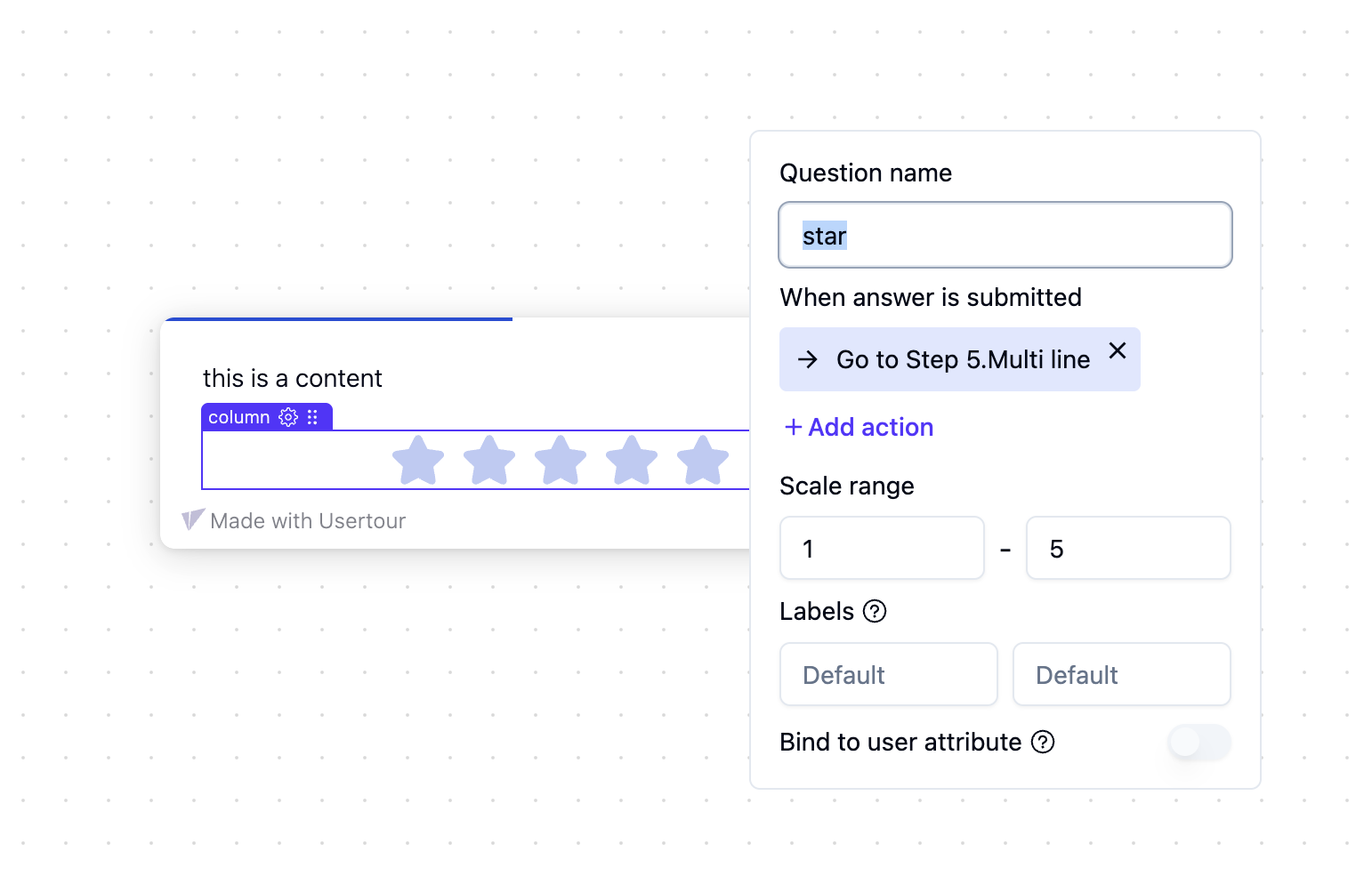
* **Question name**: Internal identifier for reporting
* **When answer is submitted**: Actions to perform after submission
* **Required**: Force users to answer before continuing
* **Bind to attribute**: Store the answer as a user attribute
### Question Types
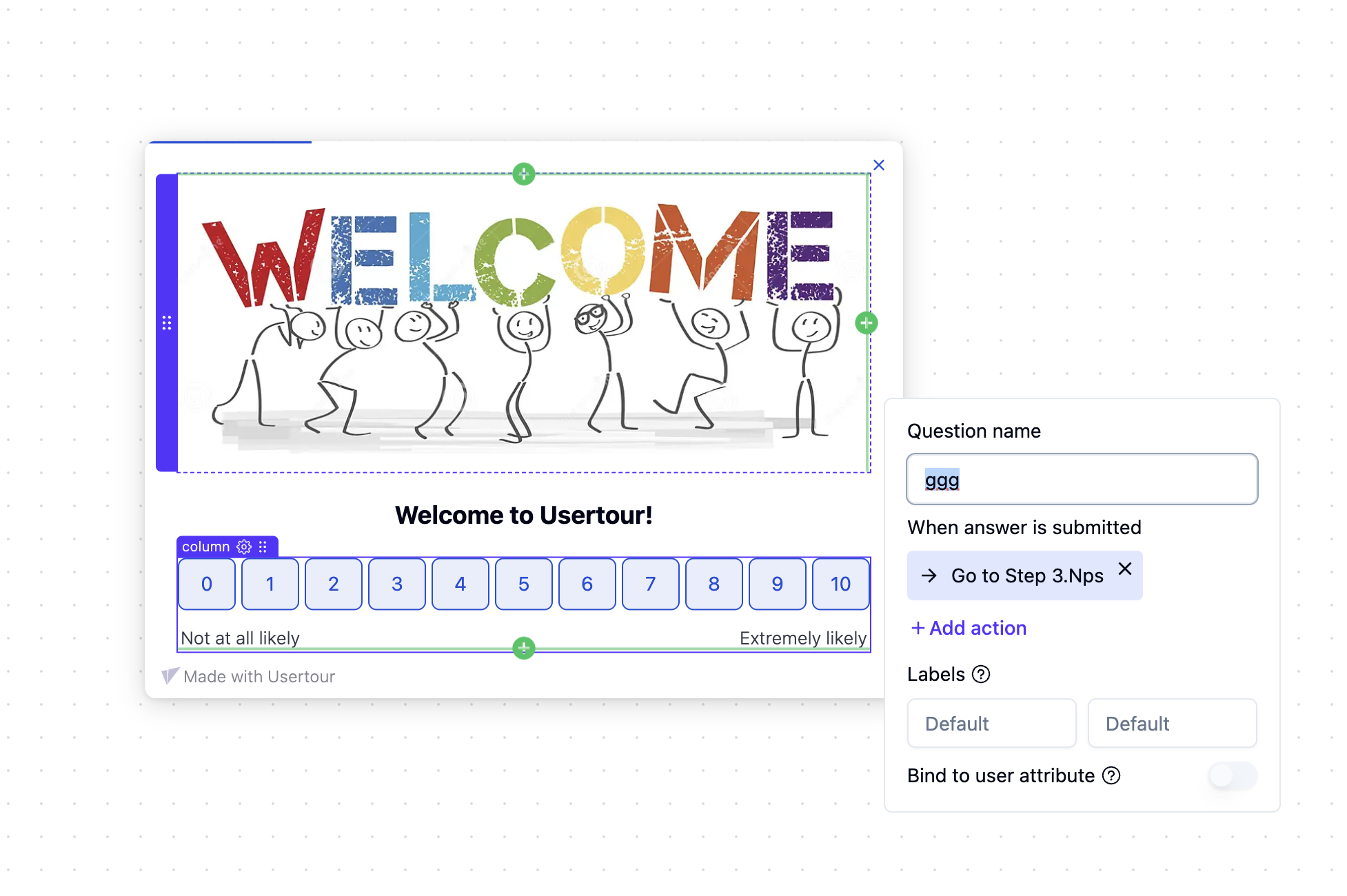
#### 1. NPS (Net Promoter Score)
A standard Net Promoter Score question with a 0-10 scale.
* Perfect for measuring customer loyalty
* Industry standard for customer satisfaction
* Easy to benchmark against other companies
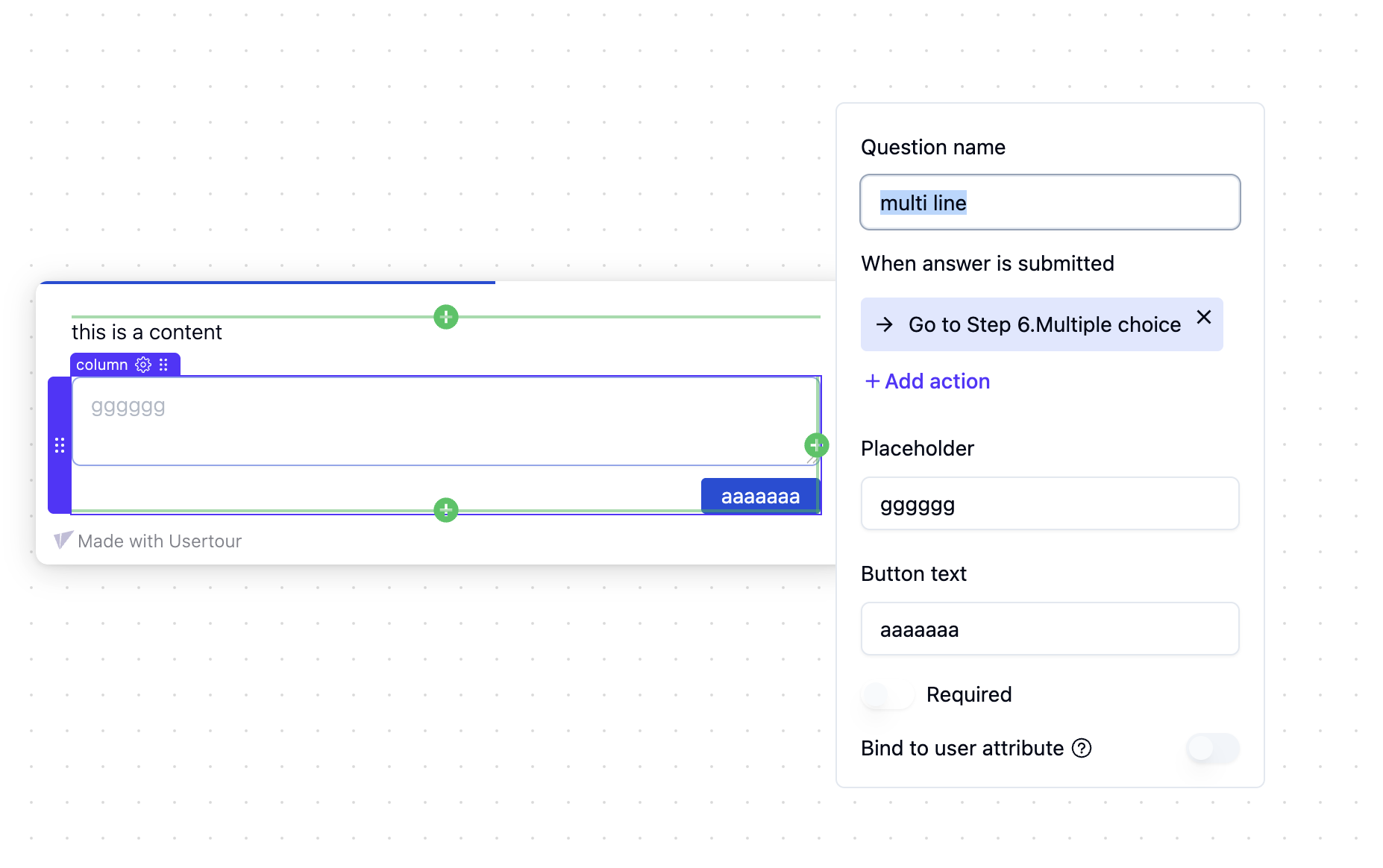
#### 2. Multi-line Text
Free-form text input for detailed feedback.
* Submit with button or Cmd/Ctrl + Enter
* Great for collecting detailed feedback
* Supports long-form responses
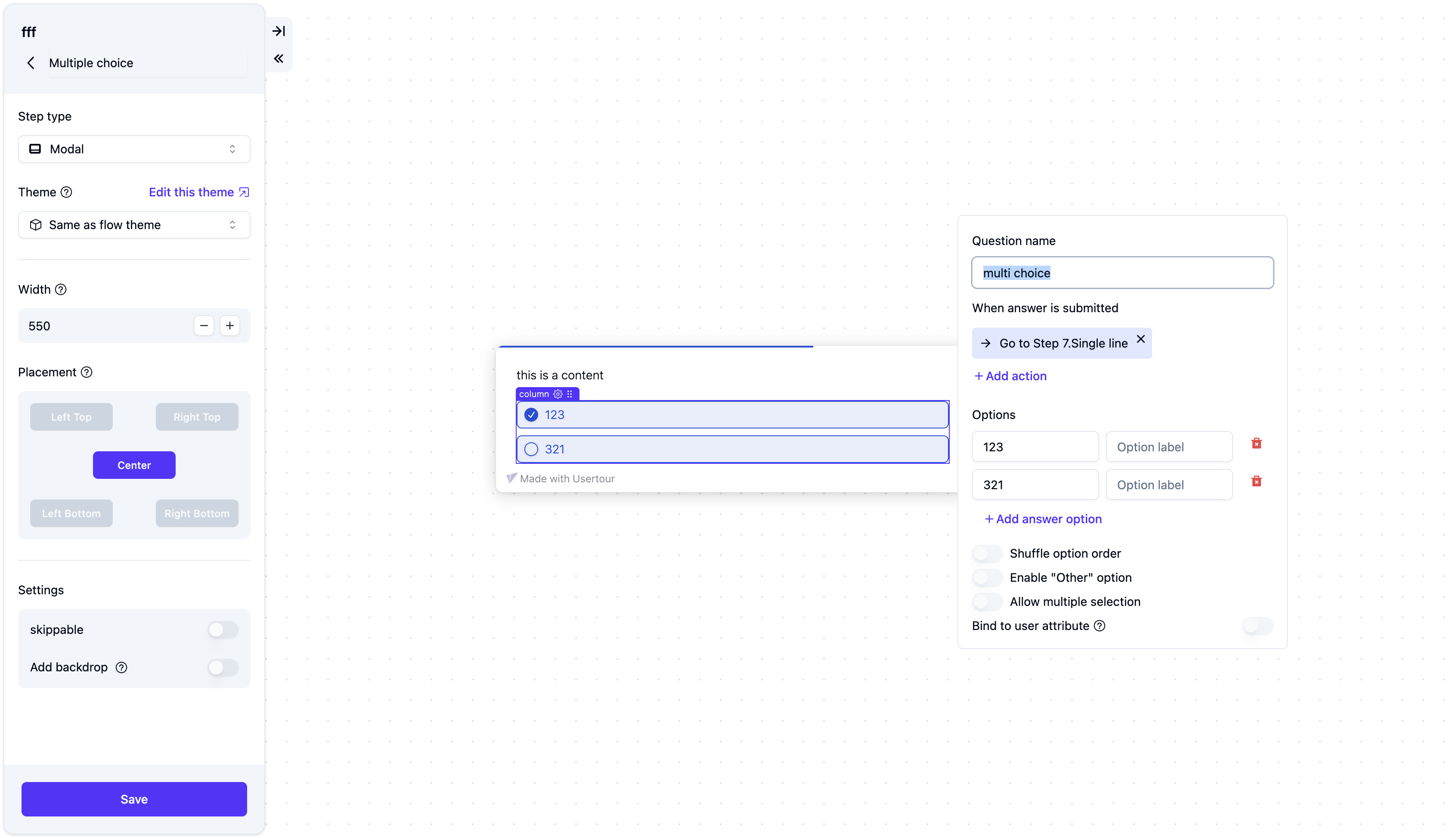
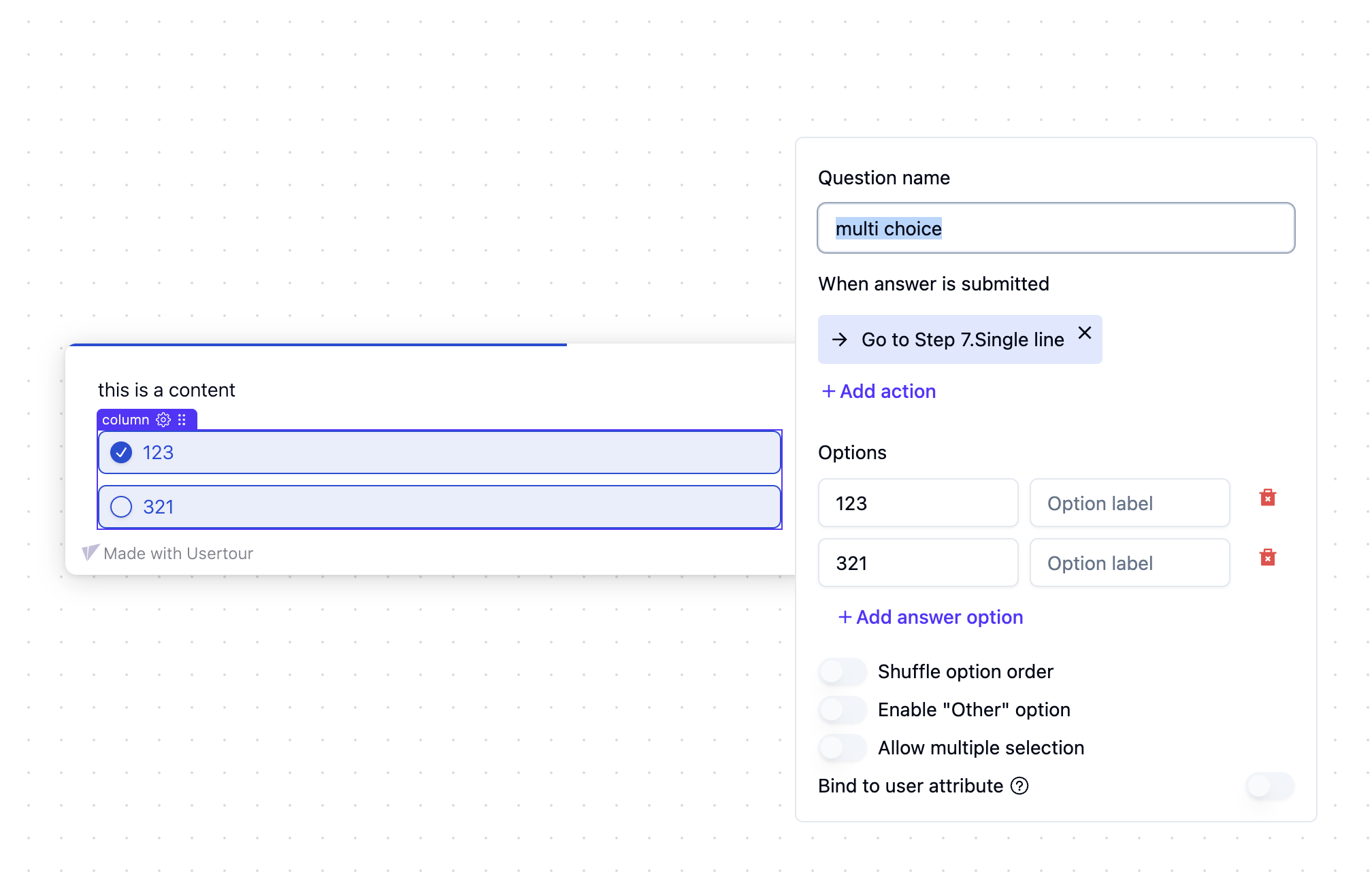
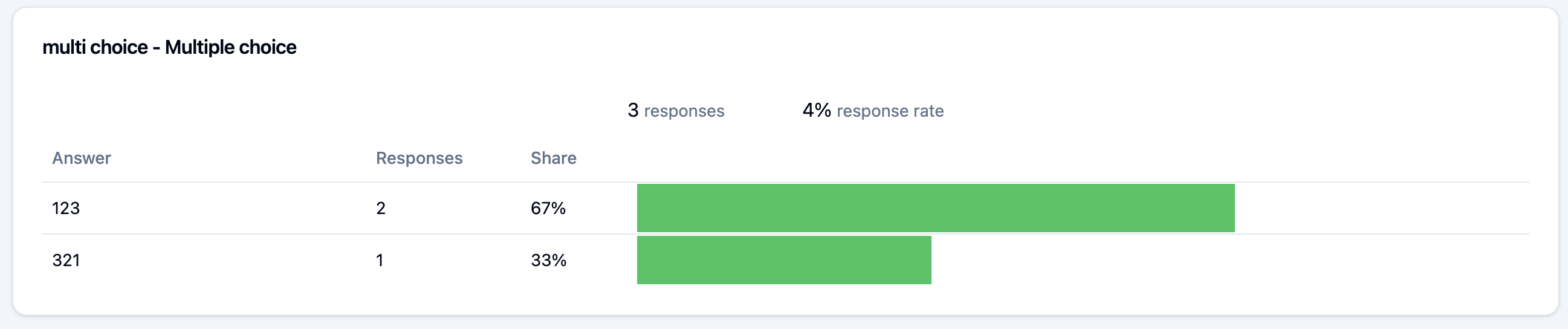
#### 3. Multiple Choice
Select one or more options:
* Enable **Multiple selection** for checkbox-style choices
* Optional "Other" field for custom input
* Perfect for structured feedback collection
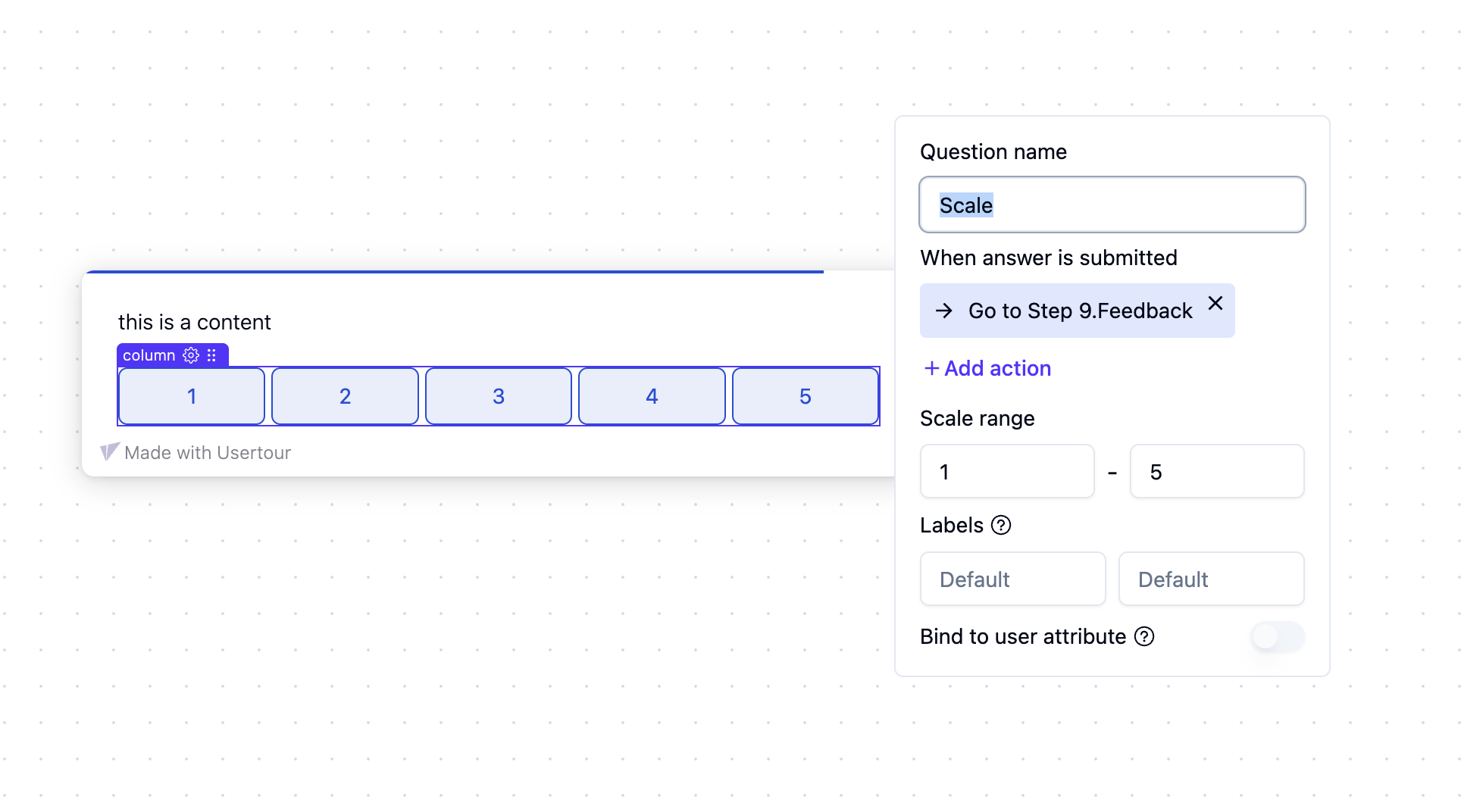
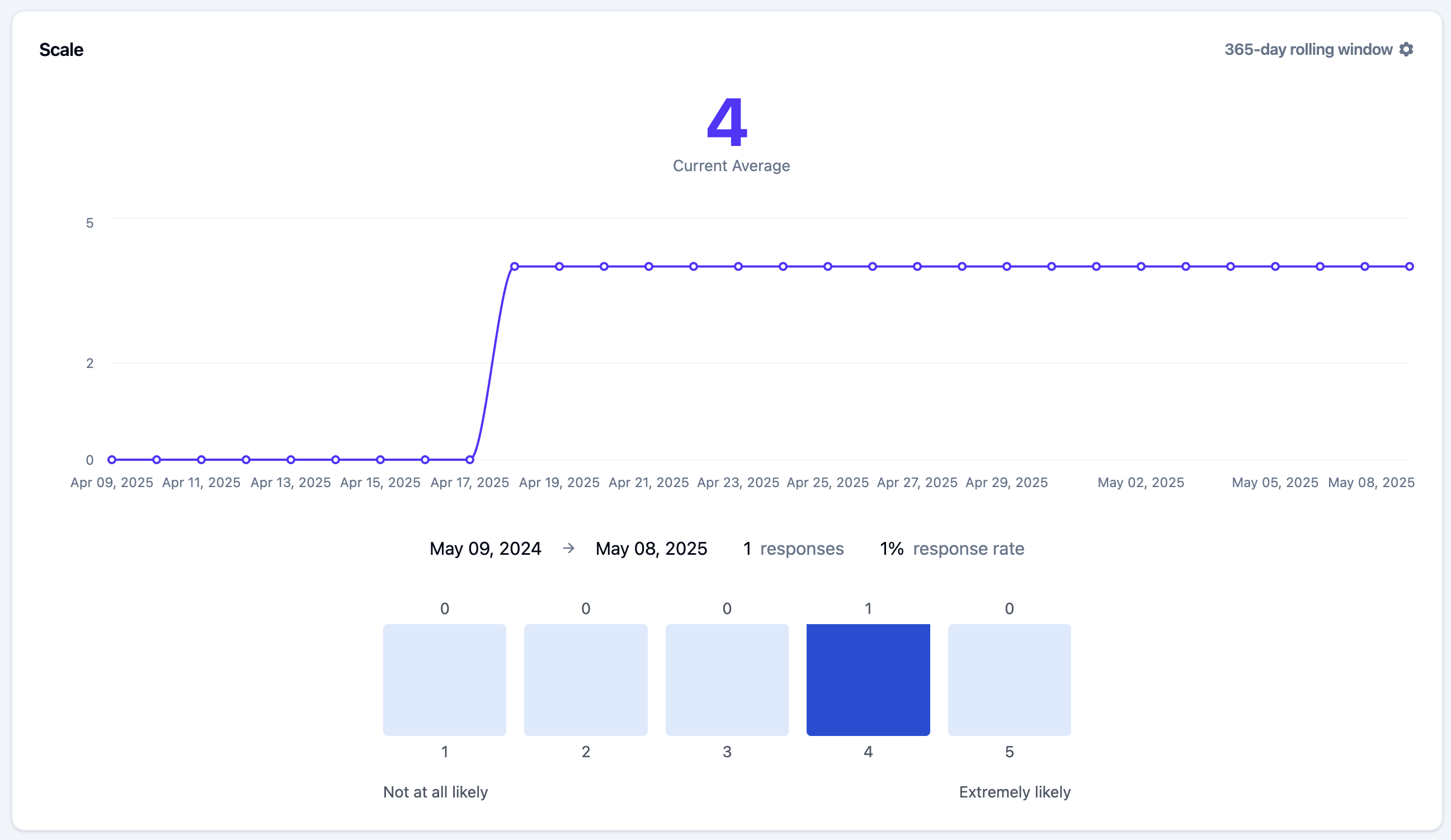
#### 4. Scale
Custom numeric scale with:
* Minimum/maximum values
* Optional labels (left/center/right)
* Great for SEQ surveys
* Flexible range configuration
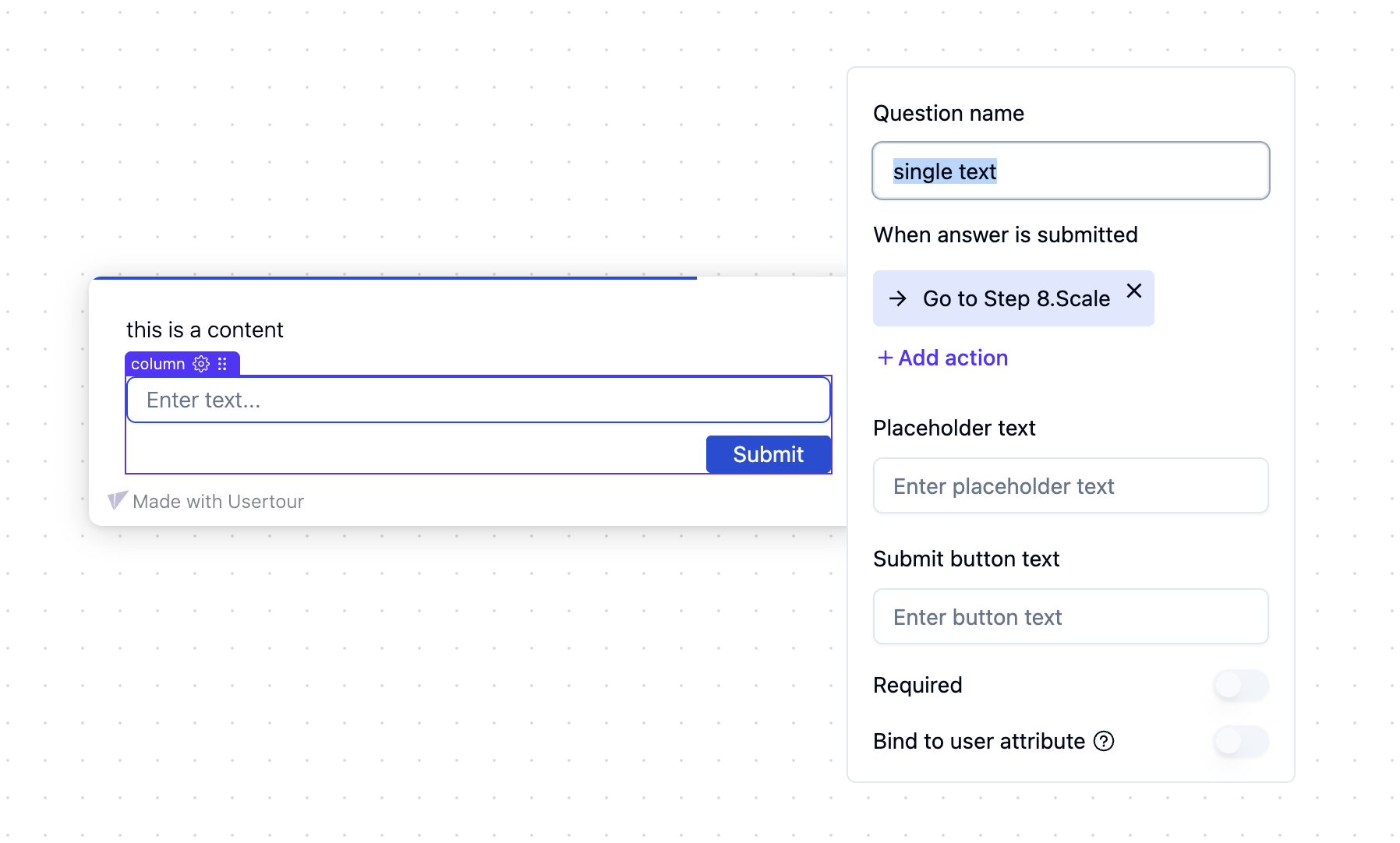
#### 5. Single-line Text
Short text input for brief responses.
* Submit with button or Enter key
* Ideal for short answers
* Quick response collection
#### 6. Star Rating
1-5 star rating for CSAT or CES surveys.
* Visual and intuitive
* Perfect for satisfaction surveys
* Easy to understand for users
## Advanced Features
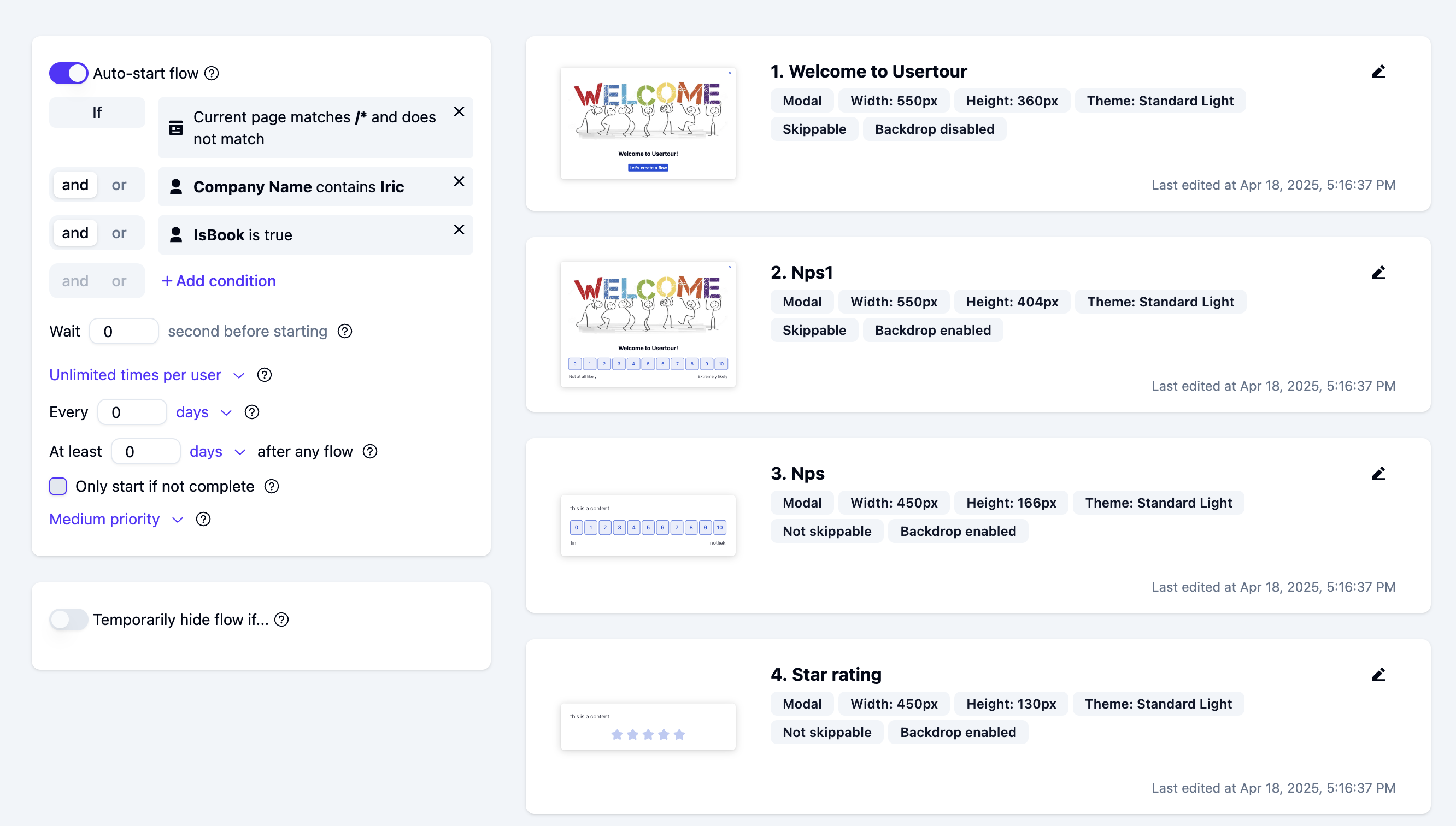
### Auto-starting Surveys
1. Use the **Auto-start flow** option
2. Set timing conditions (e.g., 30 days after signup)
3. Add delay after other flows to avoid overlap
### Recurring Surveys
For periodic surveys (e.g., every 90 days):
1. Set auto-start to **Start unlimited times** or **Start multiple times**
2. Set the interval in hours/days
3. Timing is based on last flow start
### Logic-based Branching
To create different paths based on answers:
1. Bind the answer to a user attribute
2. Create a hidden step as a router
3. Add triggers for different conditions
4. Link to appropriate follow-up steps
## Analytics
### Aggregated Stats
#### NPS
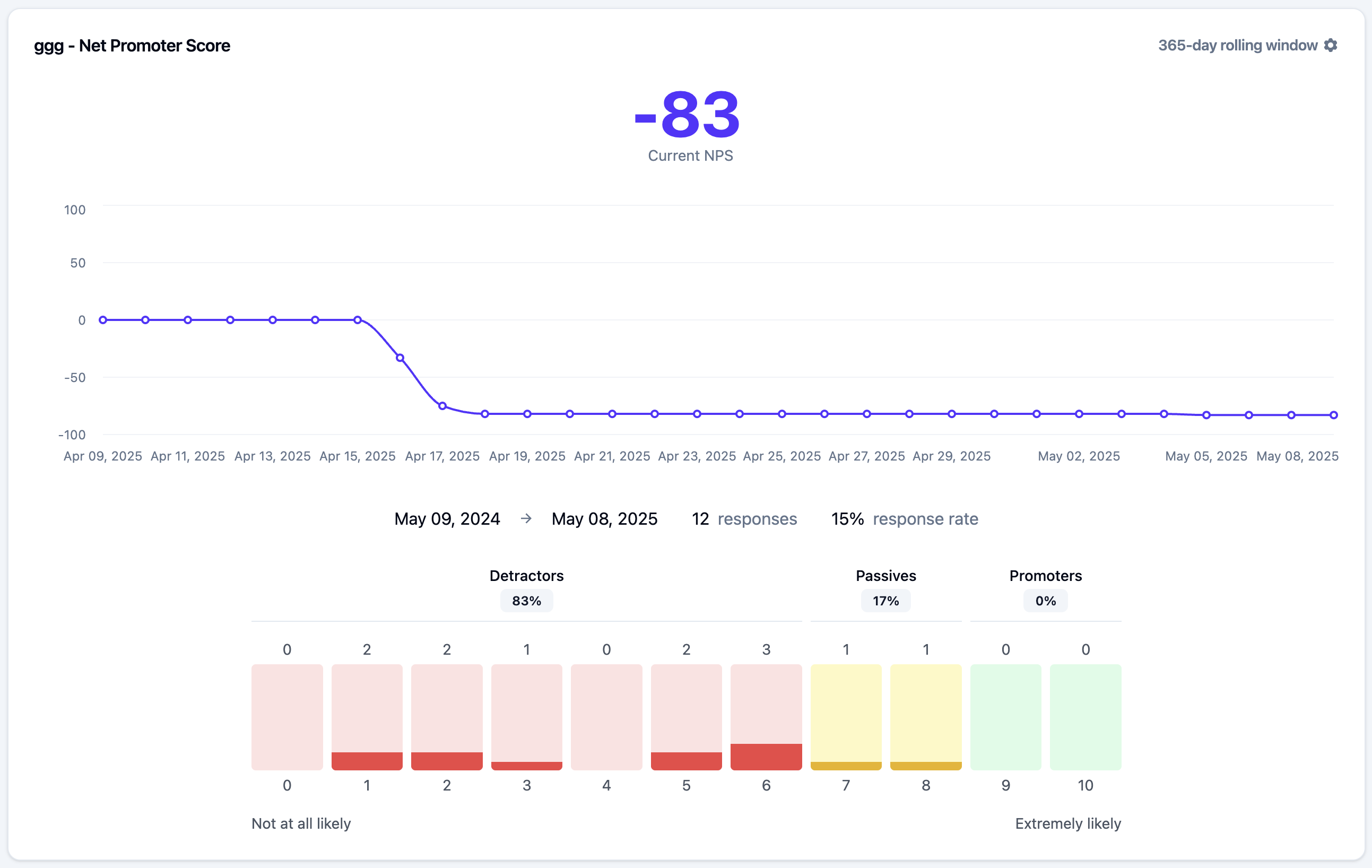
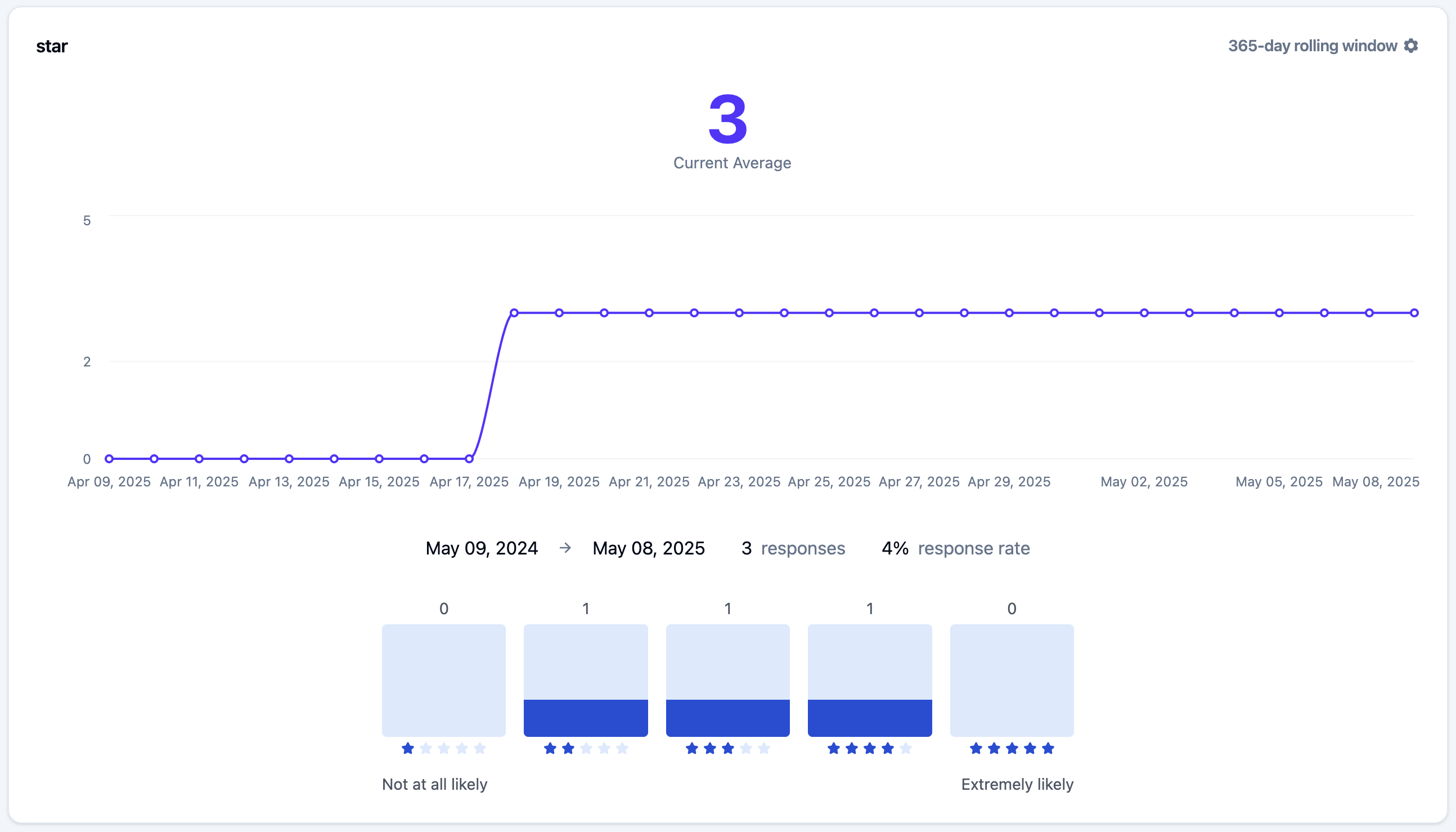
For numeric questions (NPS, star ratings):
* Current score with rolling window
* Historical trends
* Response rates
* Score distribution
> **Pro tip**: Use the rolling window to get stable numbers while still capturing recent changes. Adjust the window based on your response volume.
#### Star Rating
#### Multiple Choice
#### Scale
### Individual Responses
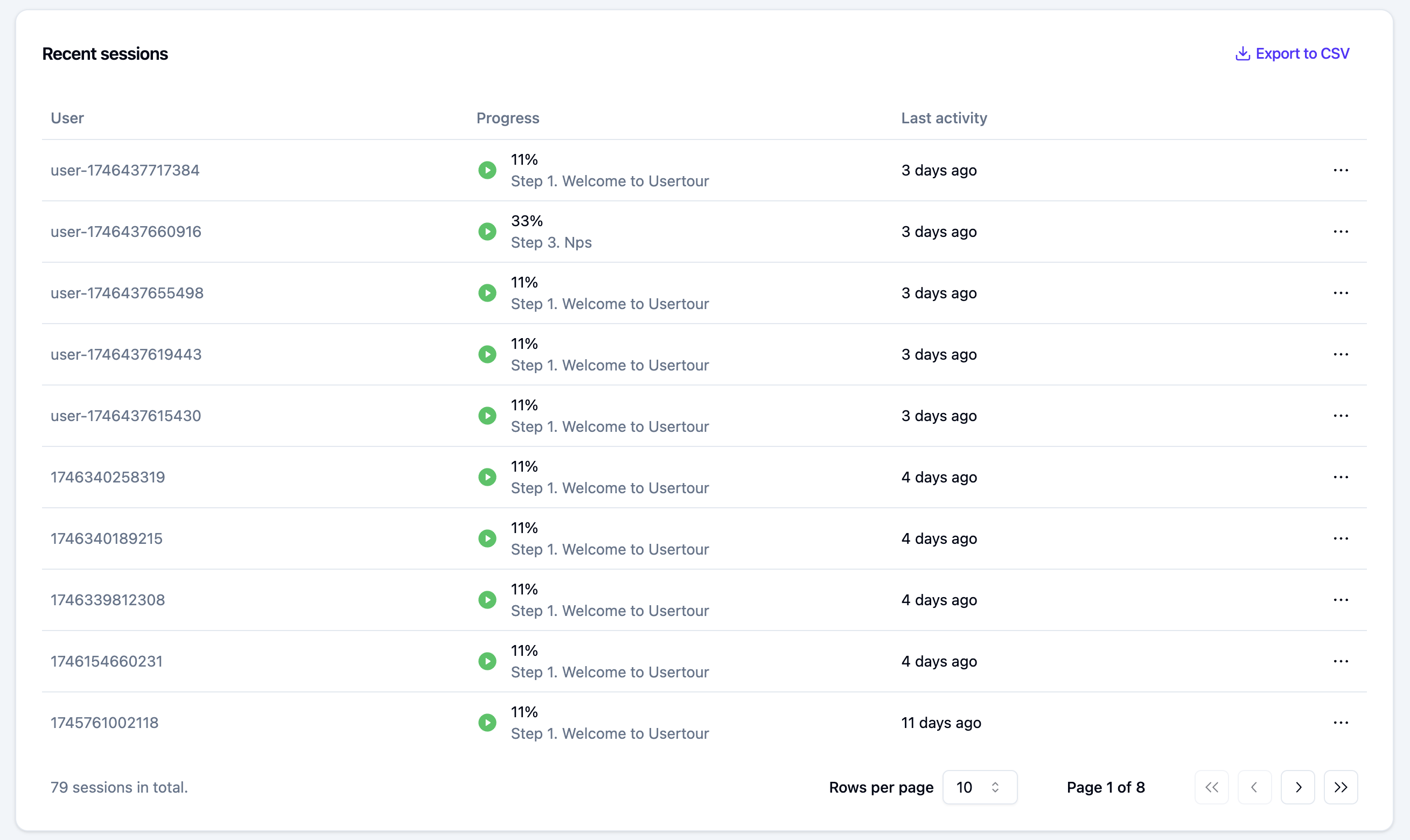
* View all responses in the **Recent sessions** list
* Click the horizontal dots (⋯) on the right to view detailed information
* Export to CSV for further analysis
### Inspecting Individual Responses
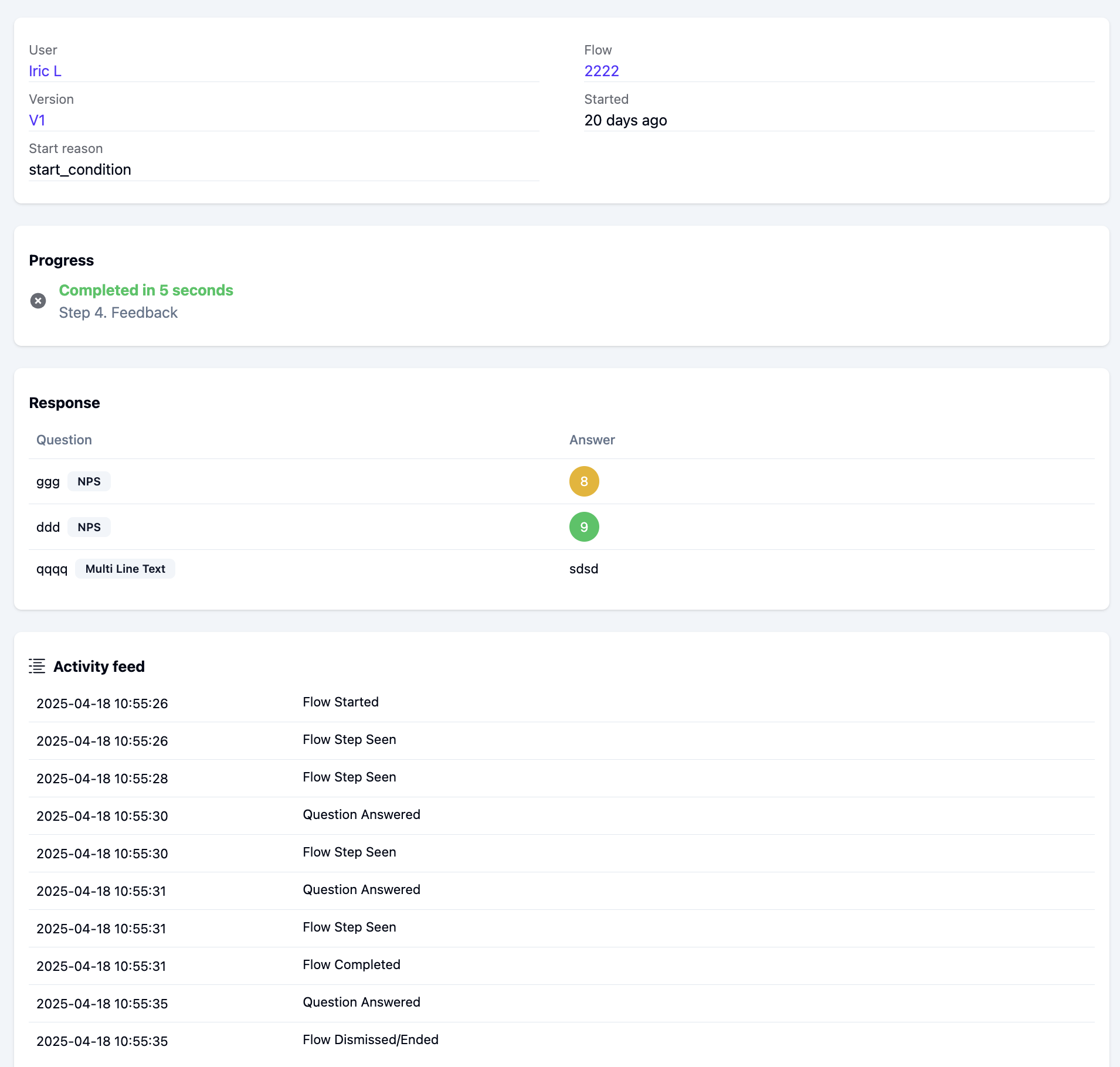
Click an individual session to see just its answers.
 ### Adding Questions
1. Add text to your first step (e.g., "What do you think about our product?")
2. Click the **+** button in the editor to open the content type selection dialog
3. Select **Question** from the dialog, which supports the following types:
* NPS (Net Promoter Score)
* Multi-line text
* Multiple choice
* Scale
* Single-line text
* Star rating
### Adding Questions
1. Add text to your first step (e.g., "What do you think about our product?")
2. Click the **+** button in the editor to open the content type selection dialog
3. Select **Question** from the dialog, which supports the following types:
* NPS (Net Promoter Score)
* Multi-line text
* Multiple choice
* Scale
* Single-line text
* Star rating
 ### Question Types
#### 1. NPS (Net Promoter Score)
A standard Net Promoter Score question with a 0-10 scale.
* Perfect for measuring customer loyalty
* Industry standard for customer satisfaction
* Easy to benchmark against other companies
### Question Types
#### 1. NPS (Net Promoter Score)
A standard Net Promoter Score question with a 0-10 scale.
* Perfect for measuring customer loyalty
* Industry standard for customer satisfaction
* Easy to benchmark against other companies
 #### 2. Multi-line Text
Free-form text input for detailed feedback.
* Submit with button or Cmd/Ctrl + Enter
* Great for collecting detailed feedback
* Supports long-form responses
#### 2. Multi-line Text
Free-form text input for detailed feedback.
* Submit with button or Cmd/Ctrl + Enter
* Great for collecting detailed feedback
* Supports long-form responses
 #### 3. Multiple Choice
Select one or more options:
* Enable **Multiple selection** for checkbox-style choices
* Optional "Other" field for custom input
* Perfect for structured feedback collection
#### 3. Multiple Choice
Select one or more options:
* Enable **Multiple selection** for checkbox-style choices
* Optional "Other" field for custom input
* Perfect for structured feedback collection
 #### 4. Scale
Custom numeric scale with:
* Minimum/maximum values
* Optional labels (left/center/right)
* Great for SEQ surveys
* Flexible range configuration
#### 4. Scale
Custom numeric scale with:
* Minimum/maximum values
* Optional labels (left/center/right)
* Great for SEQ surveys
* Flexible range configuration
 #### 5. Single-line Text
Short text input for brief responses.
* Submit with button or Enter key
* Ideal for short answers
* Quick response collection
#### 5. Single-line Text
Short text input for brief responses.
* Submit with button or Enter key
* Ideal for short answers
* Quick response collection
 #### 6. Star Rating
1-5 star rating for CSAT or CES surveys.
* Visual and intuitive
* Perfect for satisfaction surveys
* Easy to understand for users
#### 6. Star Rating
1-5 star rating for CSAT or CES surveys.
* Visual and intuitive
* Perfect for satisfaction surveys
* Easy to understand for users
 ## Advanced Features
### Auto-starting Surveys
1. Use the **Auto-start flow** option
2. Set timing conditions (e.g., 30 days after signup)
3. Add delay after other flows to avoid overlap
## Advanced Features
### Auto-starting Surveys
1. Use the **Auto-start flow** option
2. Set timing conditions (e.g., 30 days after signup)
3. Add delay after other flows to avoid overlap
 ### Recurring Surveys
For periodic surveys (e.g., every 90 days):
1. Set auto-start to **Start unlimited times** or **Start multiple times**
2. Set the interval in hours/days
3. Timing is based on last flow start
### Logic-based Branching
To create different paths based on answers:
1. Bind the answer to a user attribute
2. Create a hidden step as a router
3. Add triggers for different conditions
4. Link to appropriate follow-up steps
## Analytics
### Aggregated Stats
#### NPS
For numeric questions (NPS, star ratings):
* Current score with rolling window
* Historical trends
* Response rates
* Score distribution
### Recurring Surveys
For periodic surveys (e.g., every 90 days):
1. Set auto-start to **Start unlimited times** or **Start multiple times**
2. Set the interval in hours/days
3. Timing is based on last flow start
### Logic-based Branching
To create different paths based on answers:
1. Bind the answer to a user attribute
2. Create a hidden step as a router
3. Add triggers for different conditions
4. Link to appropriate follow-up steps
## Analytics
### Aggregated Stats
#### NPS
For numeric questions (NPS, star ratings):
* Current score with rolling window
* Historical trends
* Response rates
* Score distribution
 > **Pro tip**: Use the rolling window to get stable numbers while still capturing recent changes. Adjust the window based on your response volume.
#### Star Rating
> **Pro tip**: Use the rolling window to get stable numbers while still capturing recent changes. Adjust the window based on your response volume.
#### Star Rating
 #### Multiple Choice
 #### Scale
 ### Individual Responses
* View all responses in the **Recent sessions** list
* Click the horizontal dots (⋯) on the right to view detailed information
* Export to CSV for further analysis
### Individual Responses
* View all responses in the **Recent sessions** list
* Click the horizontal dots (⋯) on the right to view detailed information
* Export to CSV for further analysis
 ### Inspecting Individual Responses
Click an individual session to see just its answers.
### Inspecting Individual Responses
Click an individual session to see just its answers.