> ## Documentation Index
> Fetch the complete documentation index at: https://docs.usertour.io/llms.txt
> Use this file to discover all available pages before exploring further.
# Amplitude
> Stream Usertour events into Amplitude, and sync Amplitude cohorts into Usertour as targeting-ready segments.
The Amplitude integration works in both directions:
* **Events out** — every event Usertour tracks streams into your Amplitude project in real time, with `insert_id` deduplication. See [what gets sent](/integrations/overview#what-gets-sent).
* **Cohorts in** — Amplitude cohorts sync into Usertour as read-only user segments. See [cohort sync](/integrations/cohort-sync) for how synced segments behave.
## Connect
Go to **Settings → Integrations → Amplitude** and follow the [standard connect flow](/integrations/overview#connect-a-provider) with:
* **Credential:** the **API key**, found in Amplitude under **Settings → Projects →** your project (each Amplitude project has its own API key).
* **Data residency:** US or EU, matching where your Amplitude project is hosted.
## Stream events to Amplitude
Streaming starts with the first save and is controlled by the switch at the top of the page. Events arrive under the same user IDs your own instrumentation reports; delivery, retries, and the message log are described in the [overview](/integrations/overview#delivery-and-reliability).
## Sync Amplitude cohorts into Usertour
First flip **Sync Amplitude cohorts to Usertour** on and copy your webhook URL ([details](/integrations/cohort-sync#turn-on-cohort-sync-in-usertour)). Then, in Amplitude:
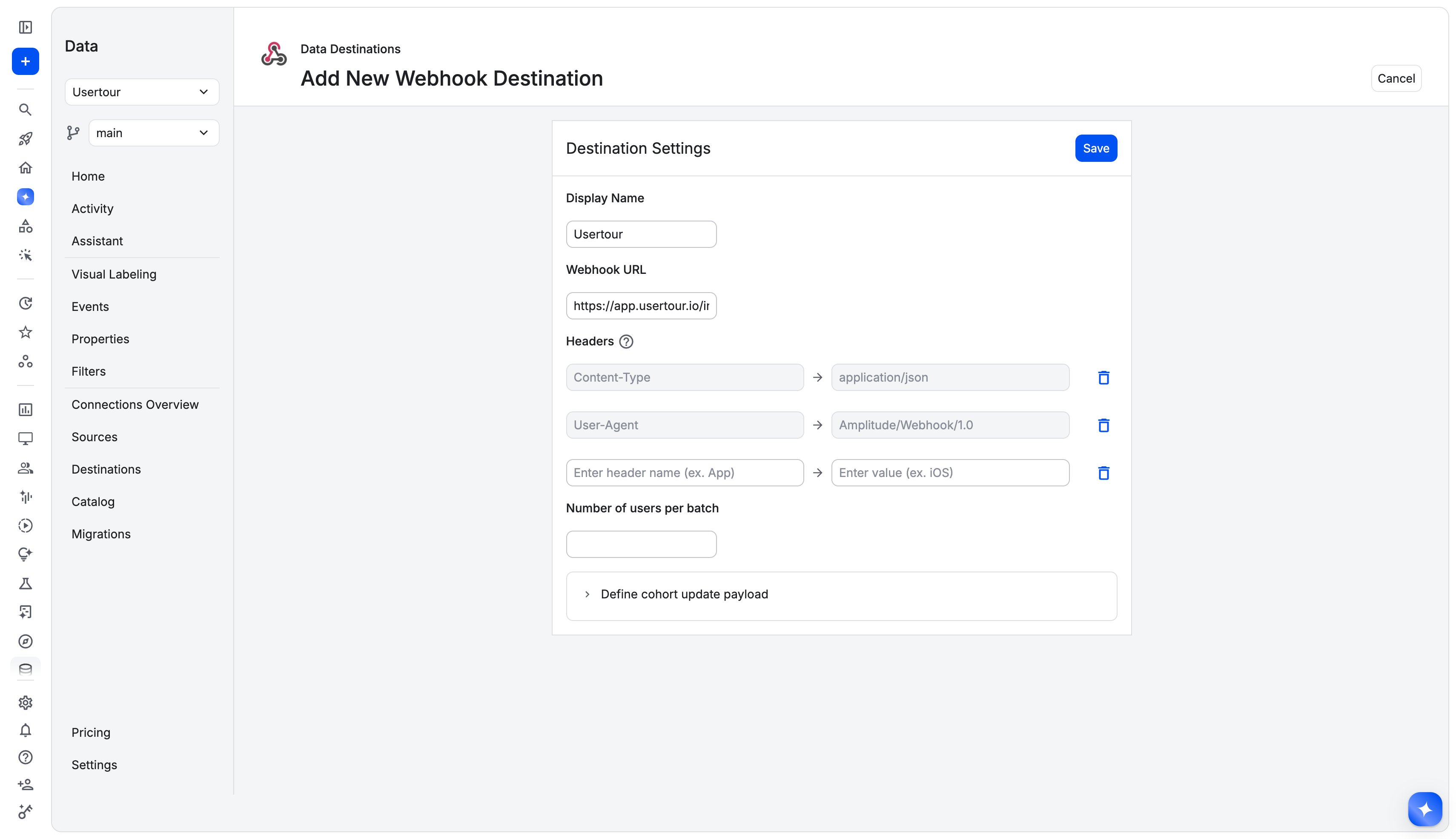
1. Go to **Data → Destinations**, and in the **Cohorts** section of the catalog choose **Webhook**. Paste your Usertour webhook URL. Leave the payload on Amplitude's **default template** — Usertour parses the default shape — and no extra headers are needed (the URL itself carries the credential).
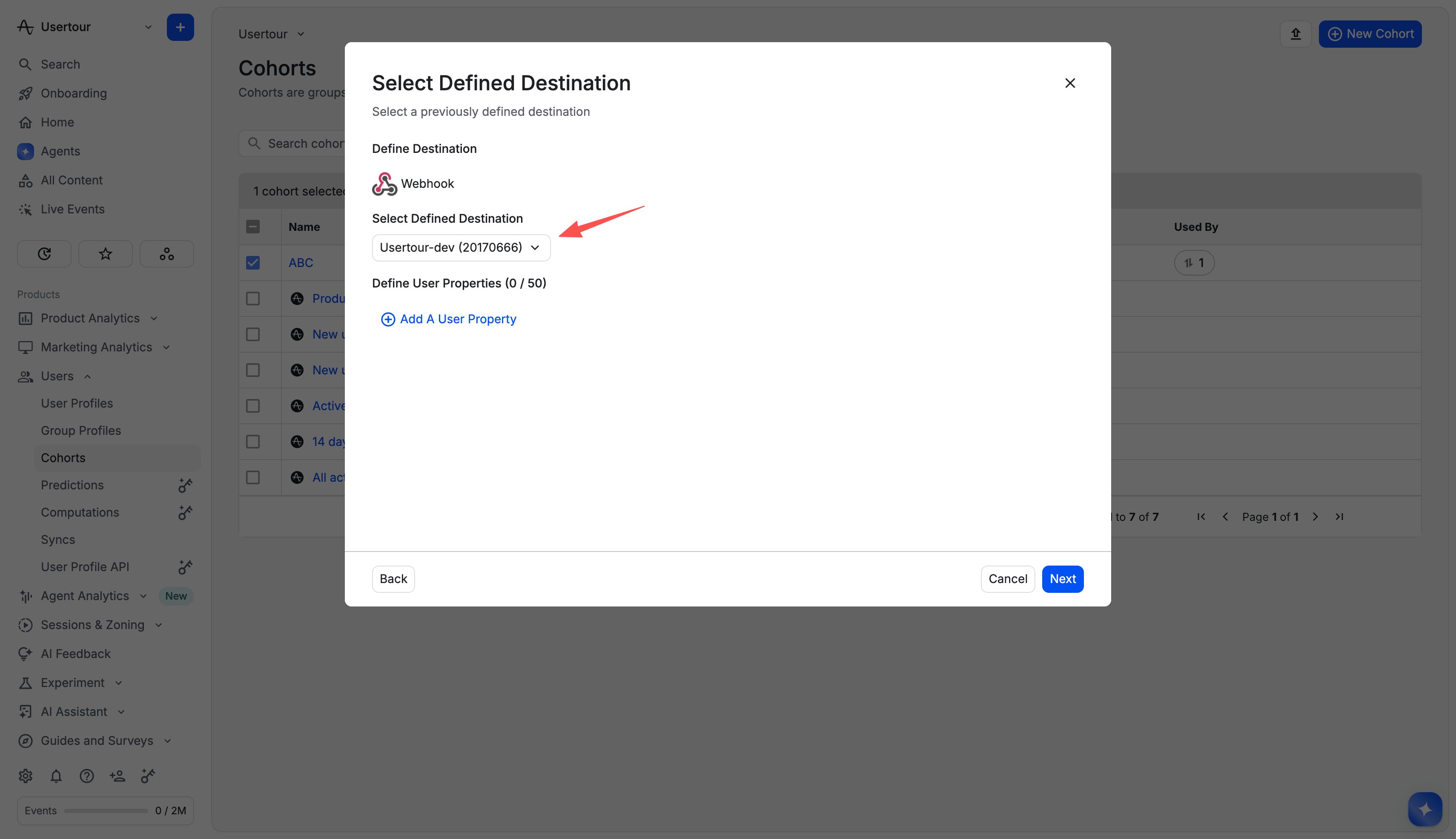
 2. Open the cohort you want to sync, click **Sync**, choose the webhook destination, pick a schedule, and start it.
 ### Identity matching
By default, a member's `user_id` is expected to equal the user ID you pass to `usertour.identify()`. When they diverge, either:
* set the **user ID property** field in Usertour's Cohort sync settings card to the name of the field on the webhook's user objects that carries the Usertour user ID, or
* solve it on the Amplitude side by customizing the webhook's payload template so `user_id` carries the right value.
## Troubleshooting
* **Unresolved count is non-zero:** the configured user ID property isn't present on the exported user objects — check the field name against the payload template. Fixed configurations read 0 again on the next delivery.
* **Nothing syncs after rotating the URL:** update the webhook destination in Amplitude with the new URL — the old one is refused immediately.
* Event-streaming issues are covered in the [overview troubleshooting](/integrations/overview#troubleshooting).
### Identity matching
By default, a member's `user_id` is expected to equal the user ID you pass to `usertour.identify()`. When they diverge, either:
* set the **user ID property** field in Usertour's Cohort sync settings card to the name of the field on the webhook's user objects that carries the Usertour user ID, or
* solve it on the Amplitude side by customizing the webhook's payload template so `user_id` carries the right value.
## Troubleshooting
* **Unresolved count is non-zero:** the configured user ID property isn't present on the exported user objects — check the field name against the payload template. Fixed configurations read 0 again on the next delivery.
* **Nothing syncs after rotating the URL:** update the webhook destination in Amplitude with the new URL — the old one is refused immediately.
* Event-streaming issues are covered in the [overview troubleshooting](/integrations/overview#troubleshooting).