> ## Documentation Index
> Fetch the complete documentation index at: https://docs.usertour.io/llms.txt
> Use this file to discover all available pages before exploring further.
# Overview
> Connect Usertour to Amplitude, Heap, Mixpanel, PostHog, or Segment — stream events out as they happen, and sync cohorts back in.
Integrations connect Usertour to your analytics stack, in both directions:
* **Events out.** Every event Usertour tracks — flow starts and completions, checklist progress, survey answers, your custom events — streams into your analytics tool in real time, ready for funnels, cohorts, and dashboards.
* **Cohorts in.** Mixpanel and Amplitude cohorts sync back into Usertour as targeting-ready user segments — see [cohort sync](/integrations/cohort-sync).
Each provider has its own page with setup steps and provider-specific notes: [Amplitude](/integrations/amplitude), [Heap](/integrations/heap), [Mixpanel](/integrations/mixpanel), [PostHog](/integrations/posthog), [Segment](/integrations/segment).
If you want events delivered to **your own endpoint** instead of an analytics tool, use [webhooks](/developers/webhooks) — same pipeline, different destination.
Key ideas, up front:
* **Integrations belong to an environment.** Production and Staging each have their own configuration; an integration only ever receives that environment's events.
* **The full event stream, as it happens.** An enabled integration receives every tracked event — built-in and custom, `page_viewed` included. There is no per-event picker; an analytics destination wants the whole stream.
* **Delivery is at-least-once with retries**, and every event carries a stable message id that the destination uses to deduplicate — a retried delivery never becomes a duplicate event.
* **Your API key is write-only and stored encrypted.** It is never shown again after you save it, and it never leaves the server except toward the provider.
* **Availability.** On Usertour Cloud, integrations are included from the **Starter** plan; self-hosted instances are never gated. Managing integrations requires the **Owner** role.
## Connect a provider
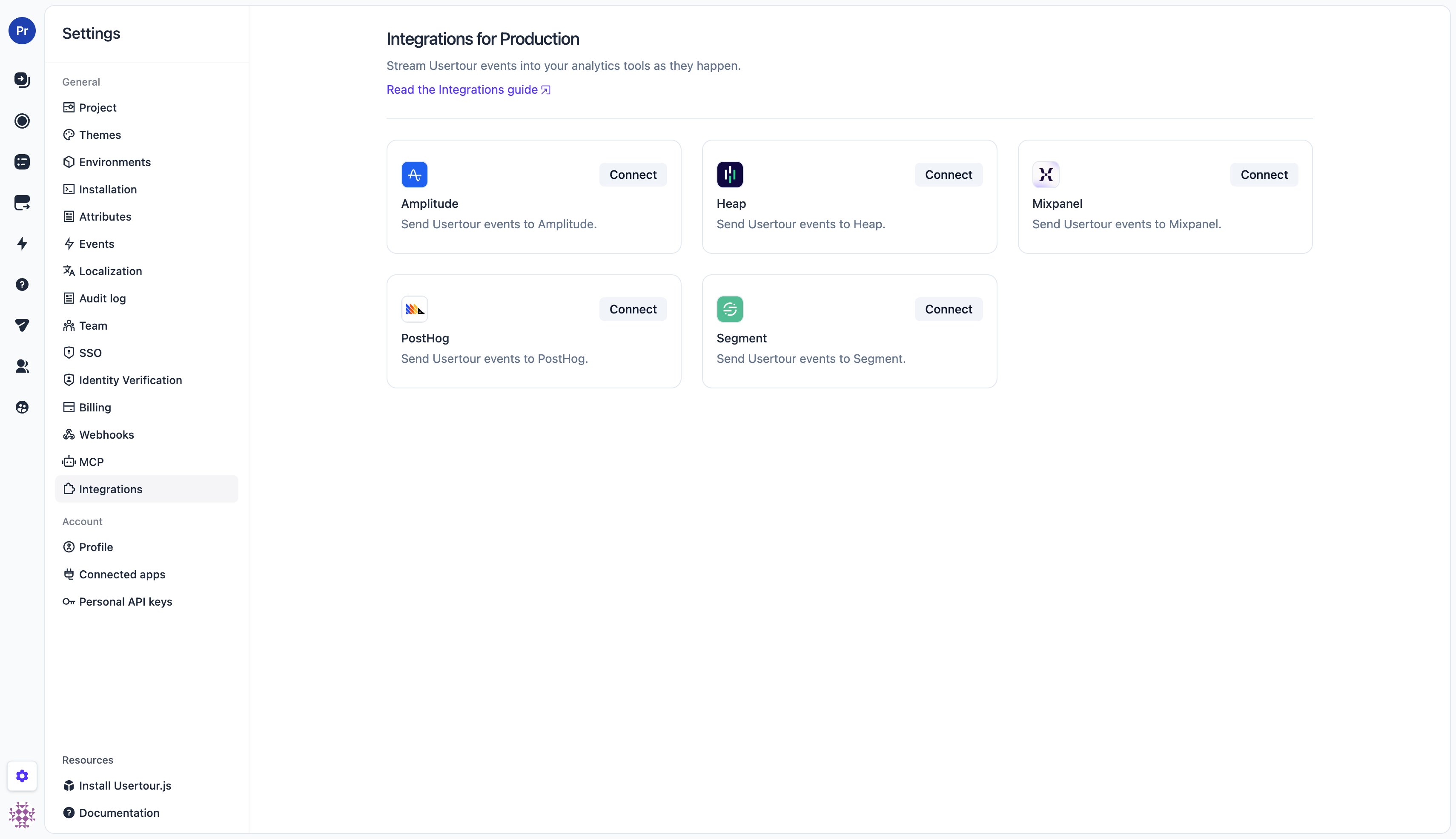
Go to **Settings → Integrations** (pick the environment first — the page is per environment) and choose a provider card.
 On the provider's page:
1. Paste the provider credential (each provider's page tells you exactly which credential and where to find it) and, where offered, pick the **data residency** region (US or EU — it must match where your provider project is hosted).
2. Click **Save**. The first save connects the integration and turns streaming on.
3. The switch at the top controls streaming from then on — flipping it takes effect immediately, no Save needed.
4. Click **Send test event** to push a sample event through the full pipeline and confirm it arrives in the provider.
On the provider's page:
1. Paste the provider credential (each provider's page tells you exactly which credential and where to find it) and, where offered, pick the **data residency** region (US or EU — it must match where your provider project is hosted).
2. Click **Save**. The first save connects the integration and turns streaming on.
3. The switch at the top controls streaming from then on — flipping it takes effect immediately, no Save needed.
4. Click **Send test event** to push a sample event through the full pipeline and confirm it arrives in the provider.
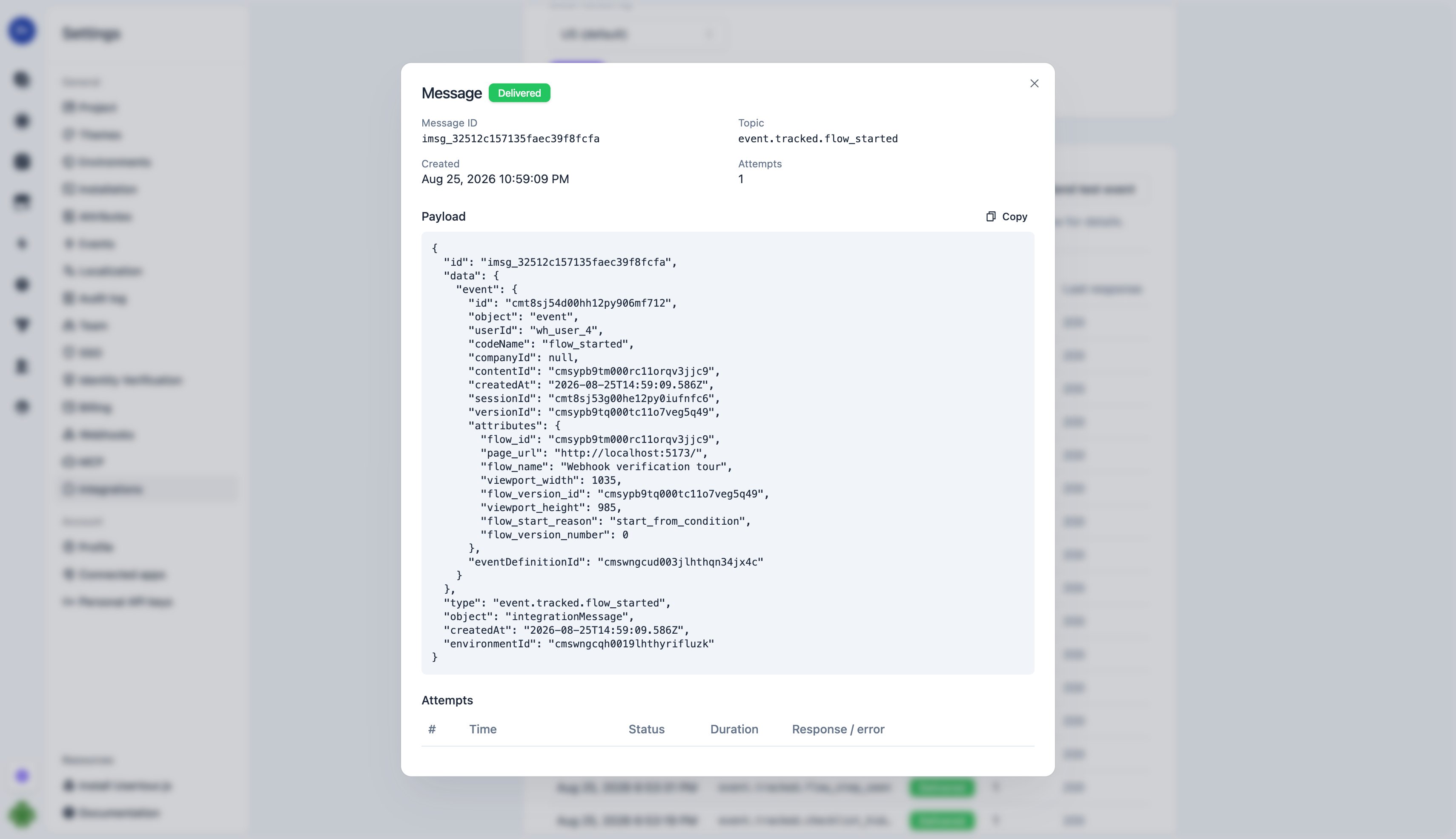
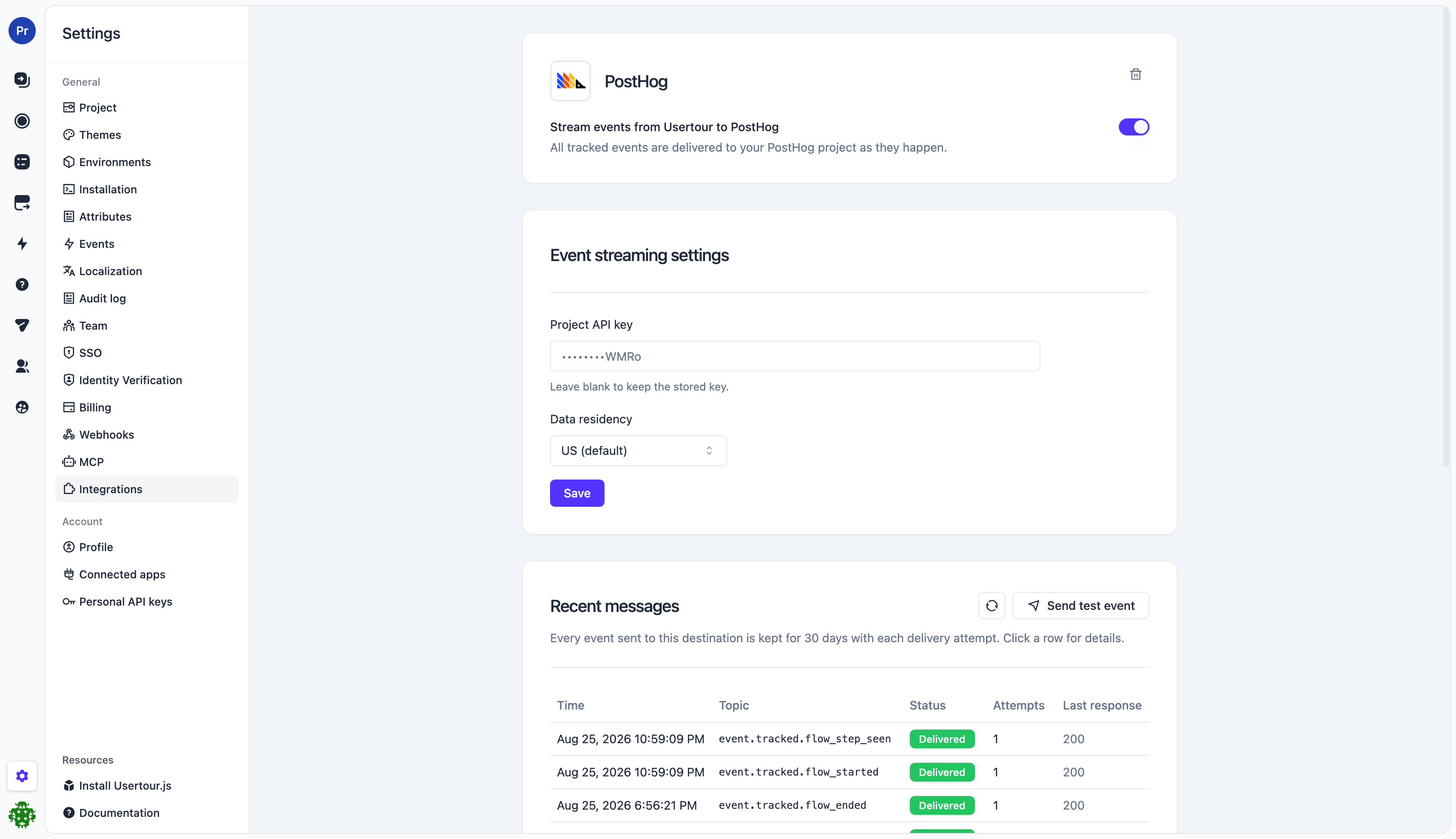 The **message log** at the bottom of the page keeps every delivered event for 30 days, with each delivery attempt and the provider's response — the first place to look when something doesn't arrive.
 ## What gets sent
Each tracked event becomes one `track`-style event at the destination:
* **Event name** — the event's code name, exactly as shown in **Settings → Events** (`flow_completed`, `checklist_task_clicked`, your custom event names, …).
* **User** — the user's ID as you identified them with `usertour.identify()`, so events line up with the same users your own instrumentation reports.
* **Timestamp** — the moment the event happened in the user's session, not the moment it was delivered.
* **Properties** — the event's attributes (`flow_id`, `flow_name`, `flow_step_number`, `page_url`, survey answers, …) plus the content session id, named by type: `flow_session_id`, `checklist_session_id`, `launcher_session_id`, `banner_session_id`, or `resource_center_session_id`. Use it to group one user's run through the same flow into a session or funnel.
* **Message id** — a stable id passed as the provider's deduplication key (Amplitude `insert_id`, Mixpanel `$insert_id`, Segment `messageId`), so a retried delivery never double-counts.
Events are delivered server-to-server, so provider-side device and geo enrichment (browser, city, country) does not apply — the event carries its own context attributes such as `page_url` and viewport size instead.
## Delivery and reliability
Delivery runs through the same pipeline as [webhooks](/developers/webhooks#delivery-retries-and-the-circuit-breaker):
* Events are queued and typically arrive within a couple of seconds.
* A failed delivery is retried on a backoff schedule spanning roughly **24 hours**, so a provider outage self-heals without losing events.
* If every attempt keeps failing (most commonly: a revoked or mistyped key), the integration **cools down** — deliveries are held, not dropped, and resume automatically.
* After **7 days** of continuous failure the integration is switched off automatically and the project owner is emailed. Fix the key and flip the switch back on — new events stream again from that moment.
## Troubleshooting
* **Nothing arrives:** check the message log — each row shows the provider's HTTP response. A `401`/`403` means the credential is wrong; re-enter it and use **Send test event** to verify.
* **Auto-disabled badge:** the integration failed continuously for a week. The most common cause is a rotated or revoked key — update it and re-enable.
* **Events look duplicated in the provider:** they shouldn't be — retries share the original message id. If you see duplicates with *different* ids, check whether another pipeline (e.g. the provider's own SDK on your site) reports the same actions.
* **Region mismatch:** a key from an EU project sent to the US endpoint (or vice versa) is rejected by the provider — make sure the data residency setting matches the project the key belongs to.
## Removing an integration
The trash icon on the provider's page removes the configuration: streaming stops immediately, and the stored key and the message log are deleted. Synced segments are released back into ordinary, editable segments (members included). Your data already delivered to the provider is not affected.
## What gets sent
Each tracked event becomes one `track`-style event at the destination:
* **Event name** — the event's code name, exactly as shown in **Settings → Events** (`flow_completed`, `checklist_task_clicked`, your custom event names, …).
* **User** — the user's ID as you identified them with `usertour.identify()`, so events line up with the same users your own instrumentation reports.
* **Timestamp** — the moment the event happened in the user's session, not the moment it was delivered.
* **Properties** — the event's attributes (`flow_id`, `flow_name`, `flow_step_number`, `page_url`, survey answers, …) plus the content session id, named by type: `flow_session_id`, `checklist_session_id`, `launcher_session_id`, `banner_session_id`, or `resource_center_session_id`. Use it to group one user's run through the same flow into a session or funnel.
* **Message id** — a stable id passed as the provider's deduplication key (Amplitude `insert_id`, Mixpanel `$insert_id`, Segment `messageId`), so a retried delivery never double-counts.
Events are delivered server-to-server, so provider-side device and geo enrichment (browser, city, country) does not apply — the event carries its own context attributes such as `page_url` and viewport size instead.
## Delivery and reliability
Delivery runs through the same pipeline as [webhooks](/developers/webhooks#delivery-retries-and-the-circuit-breaker):
* Events are queued and typically arrive within a couple of seconds.
* A failed delivery is retried on a backoff schedule spanning roughly **24 hours**, so a provider outage self-heals without losing events.
* If every attempt keeps failing (most commonly: a revoked or mistyped key), the integration **cools down** — deliveries are held, not dropped, and resume automatically.
* After **7 days** of continuous failure the integration is switched off automatically and the project owner is emailed. Fix the key and flip the switch back on — new events stream again from that moment.
## Troubleshooting
* **Nothing arrives:** check the message log — each row shows the provider's HTTP response. A `401`/`403` means the credential is wrong; re-enter it and use **Send test event** to verify.
* **Auto-disabled badge:** the integration failed continuously for a week. The most common cause is a rotated or revoked key — update it and re-enable.
* **Events look duplicated in the provider:** they shouldn't be — retries share the original message id. If you see duplicates with *different* ids, check whether another pipeline (e.g. the provider's own SDK on your site) reports the same actions.
* **Region mismatch:** a key from an EU project sent to the US endpoint (or vice versa) is rejected by the provider — make sure the data residency setting matches the project the key belongs to.
## Removing an integration
The trash icon on the provider's page removes the configuration: streaming stops immediately, and the stored key and the message log are deleted. Synced segments are released back into ordinary, editable segments (members included). Your data already delivered to the provider is not affected.