

- One cohort, one segment. Each synced cohort materializes as a single user segment per project. Sync the same cohort from several environments and they feed the same segment — targeting rules reference one segment everywhere, while membership is matched per environment.
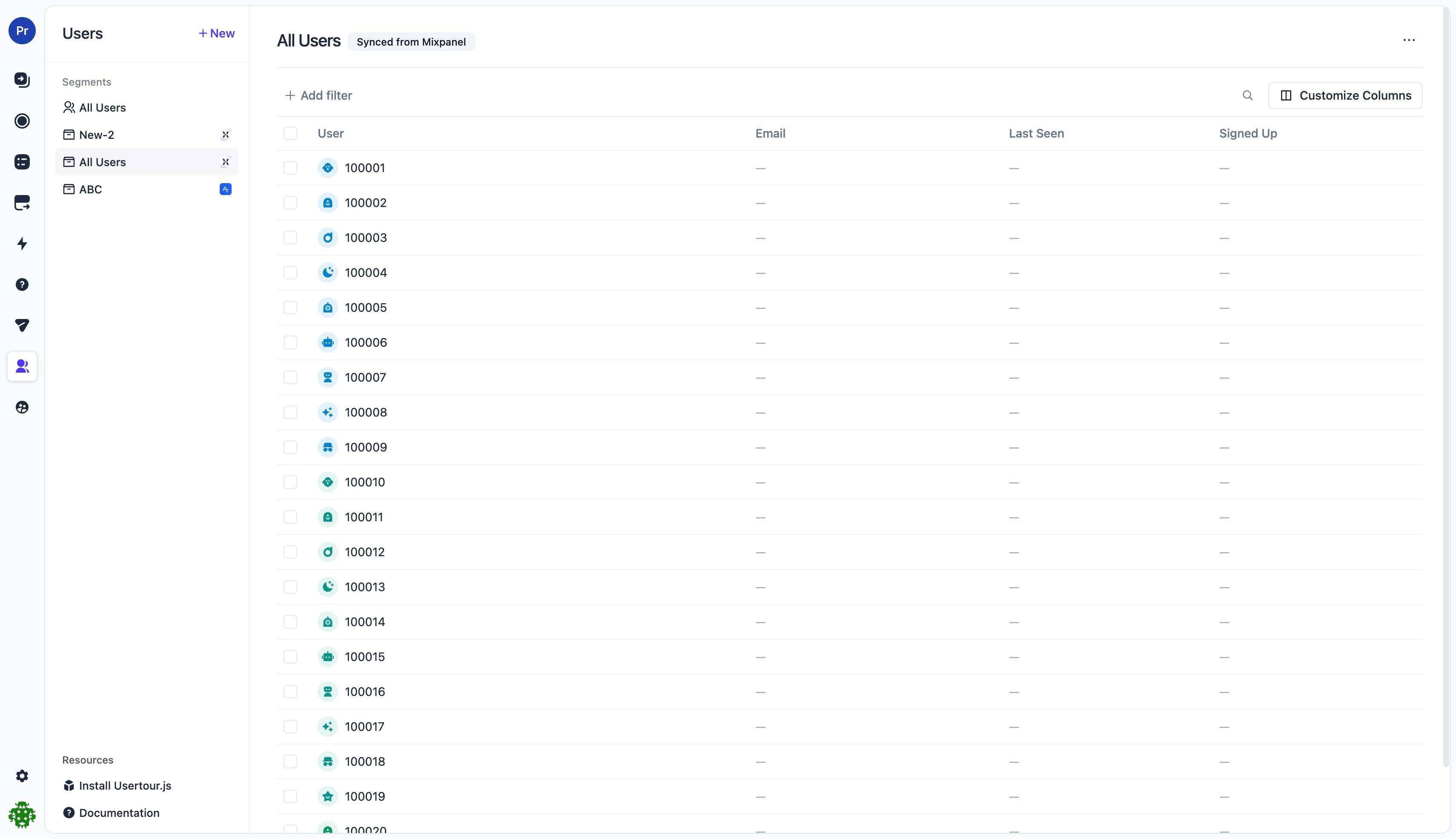
- The segment is read-only. Its name and members follow the source cohort; you can’t rename it or edit membership by hand. Column settings stay editable, and you can still use it everywhere segments work — targeting conditions, filters, the Users page.
- Unknown members become users. A cohort member with no matching Usertour user is created automatically as a bare user (ID only). That’s the point of the feature: circle people first, greet them when they arrive. Created users count toward your plan’s user quota.
- Attributes are never written. Cohort sync only manages membership. User attributes keep exactly one source of truth — your
usertour.identify()calls and the API. - Availability. Same as event streaming: included from the Starter plan on Usertour Cloud, never gated on self-hosted instances, and managing it requires the Owner role.
Turn on cohort sync in Usertour
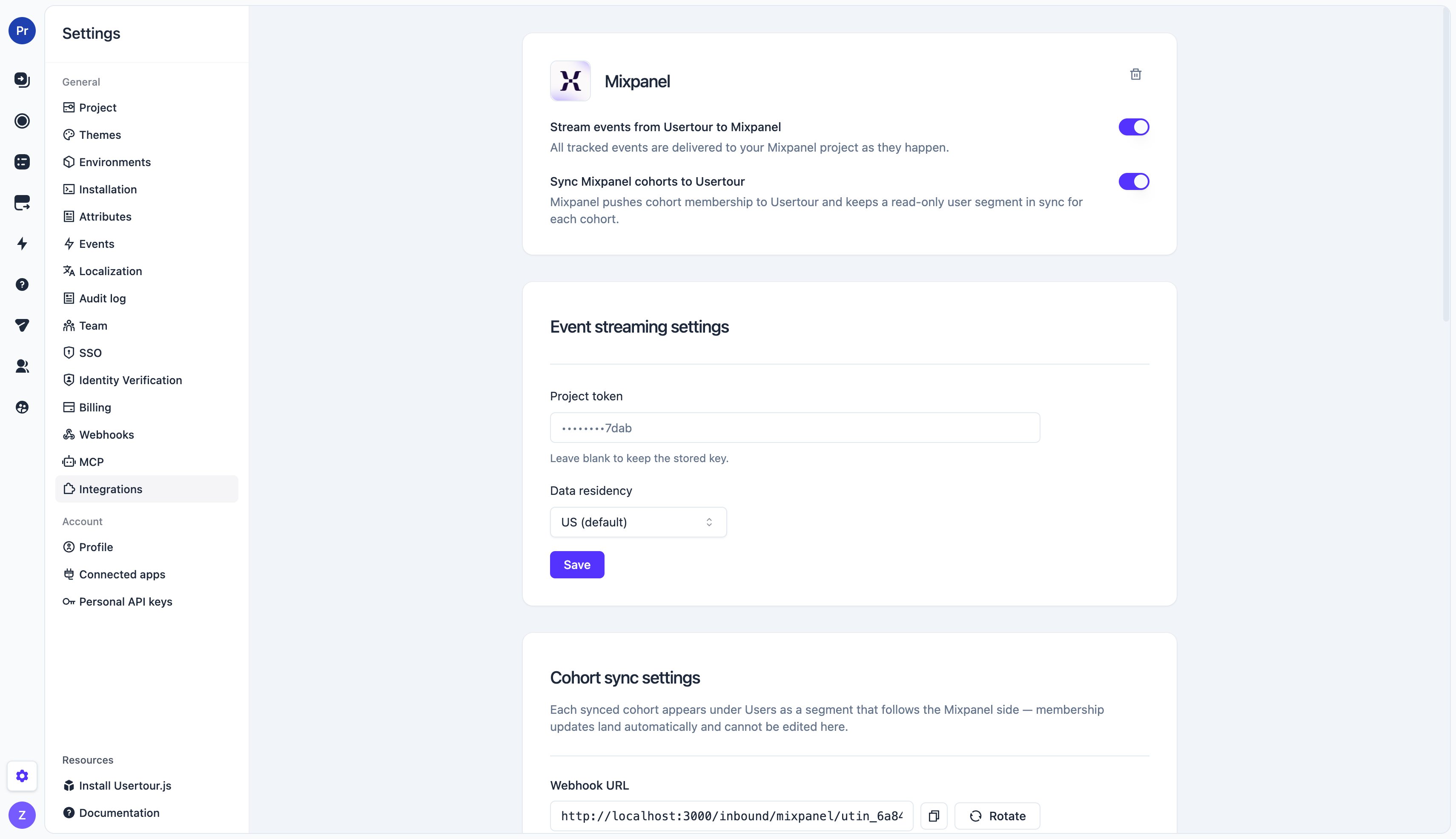
Cohort sync lives on the provider’s integration page, so connect the provider first if you haven’t (see connecting a provider).- On the provider’s page, flip Sync cohorts to Usertour on. This generates your webhook URL in the Cohort sync settings card below.
- Copy the URL. Treat it like a secret — anyone who has it can push members. If it ever leaks, Rotate mints a new URL and kills the old one instantly (remember to update it on the provider side).
- Configure the provider to push cohorts to that URL — the exact steps are on the provider’s page:
Identity matching
Members are matched to Usertour users by ID: the provider’s user identifier (Mixpanel’sdistinct_id, Amplitude’s user_id) is expected to equal the user ID you pass to usertour.identify(). If you use Usertour’s outbound event streaming, the two sides already agree — outbound events are reported under that same ID.
When the IDs diverge, set the user ID property field in the Cohort sync settings card to the name of the member field that carries the Usertour user ID — each provider’s page explains exactly what to put there and what else it requires.
Members whose data carries no readable user ID are skipped and counted in the Unresolved column of the Synced cohorts table — a non-zero count almost always means the configured property isn’t included in the data the provider exports.
How syncing behaves
- Membership mirrors the source. Adds and removes apply as they arrive; a full export replaces the roster. Deliveries are idempotent — provider retries never duplicate members.
- Segments are project-wide, membership is per environment. The segment shows up in every environment’s Users page and targeting picker; in each environment it contains the members matched (or created) in that environment, which is exactly what targeting evaluates at runtime.
- Synced segments are marked. The provider’s logo appears next to the segment in the Users sidebar and in targeting condition pickers, and the segment header shows a “Synced from …” badge.
- Deleting things is safe. Deleting the segment just removes the mirror — the next sync recreates it. Removing the integration (or deleting the environment) releases the segment back into an ordinary, editable segment and keeps its members. Users created by cohort sync are normal users and are never deleted by the sync.
Troubleshooting
- Unresolved count is non-zero: the configured user ID property isn’t present in the exported member data — check the field name and the provider page’s notes on exporting it. The counter reflects the most recent delivery, so it drops back to 0 once fixed.
- Cohort sync was disabled in Usertour while syncs kept running: deliveries are refused while the switch is off, and the provider retries on its schedule — flip the switch back on and membership catches up on the next cycle.
- The URL leaked: click Rotate in the Cohort sync settings card, then update the webhook URL on the provider side.